Block Code Music Unblocked
Code a melody note by note, then fold repeated phrases into functions and build a round.
Tip: rotate your phone to landscape for a larger view.
What is Block Code Music?
Block Code Music is a coding puzzle where your blocks play notes instead of moving a character. Over ten levels you program a familiar French nursery round, learn to wrap repeated phrases in functions, add rests and instruments, and finally run several voices at once. The last level is open for free composing.
- Category
- Puzzle Games
- Players
- 1 player
- Plays on
- Best on desktop, playable on touch
- Input
- Mouse, Touch, Keyboard
- Made by
- Blockly Games by Google
- Checked
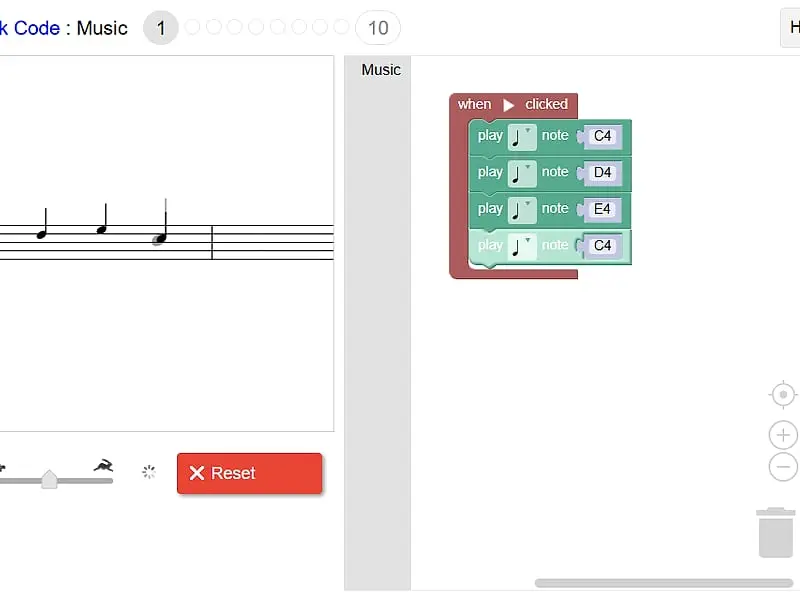
Block Code Music is the coding game you can hear. A music staff on the left shows a target melody as faint gray notes, and as your program runs, black notes appear on top of them one by one. If the two line up, you have solved the level. The whole set revolves around “Frère Jacques”, which is a clever choice: the song repeats itself constantly, and that repetition is the perfect reason to learn functions. Like the rest of Google’s Blockly Games, it runs unblocked in a browser tab with nothing to install.
Building the Tune Level by Level
Every program starts inside a “when Run clicked” block. You drop “play note” blocks into it, choose a pitch and a length for each, and press Run Program. The game checks your notes against the target and, when they match, shows the JavaScript your blocks turned into.
Here is roughly how the ten levels unfold:
- Four notes. C4, D4, E4, C4, the opening of the round.
- Play them twice, but add no new notes. The only way is to put the phrase in a function and call it two times.
- More phrases, more functions. Each new part of the song gets its own named function until the melody is complete.
- New blocks. A set-instrument block switches between piano, trumpet, banjo, violin, guitar, flute, drum and choir, and a rest block adds silence.
- Several start blocks at once. Each one is a separate voice. Delay them with rests and they overlap into a proper round, up to four parts.
- Level 10 is open. No target, just a toolbox for writing your own piece.
From the function levels onward, a program that plays the right notes by copying blocks gets a reminder that it could be written more neatly.
Block Code Music controls
| To do this | Keyboard | Mouse | Touch |
|---|---|---|---|
| Drag in note, rest or function blocks | — | Click the Music category and drag a block into the workspace | Tap the category and drag a block |
| Set the pitch of a note | Type a note name such as D4 and press Enter | Click the note name and pick a line on the small staff | Tap the note name and pick a line |
| Set how long a note lasts | — | Click the note symbol on the block | Tap the note symbol |
| Play the tune or stop it | — | Click Run Program, then Reset | Tap Run Program, then Reset |
| Speed playback up or down | — | Drag the tempo slider | Slide the tempo control |
Practical Advice for Cleaner Programs
Give your functions descriptive names, such as “brother John” or “morning bells”, based on the lyrics. Reading a stack of four well-named calls is much easier than scrolling through sixteen loose notes.
Use the staff as your debugger. A black note sitting on a different line than the gray one points straight to the wrong pitch. If the notes are right but the rhythm feels off, look for the phrase that ends on a longer note and change that block’s length instead of adding another one.
Turn down the tempo slider while testing a round. At slow speed you can hear where each voice comes in, and it becomes clear whether your rests are the right size. Assigning a different instrument to each start block helps too, since a violin and a flute are easier to tell apart than four pianos.
A Different Kind of Coding Puzzle
Most programming games are about movement or logic. This one is about structure, and the reward is a song that actually sounds good. It pairs naturally with Tiny Synth Piano if you want to play notes by hand, and with Block Code Maze for a more traditional take on the same block editor.
Block Code Music: questions players ask
Do I need to read music to play Block Code Music?
Not really. The staff shows gray target notes and your notes appear in black as they play, so you can match positions by eye. Knowing note names like C4 and E4 helps, but you pick them from a list anyway.
How do I pass level 2 without adding note blocks?
Move the four notes from level 1 into a function block, then place two calls to that function inside the start block. The game only accepts the version that reuses the phrase.
Can I make my own song?
Yes. Level 10 has no target melody, so you can arrange any notes, rests, instruments and voices you like and play them back.
Is there any sound before I press Run?
No. The page stays silent until you run a program, which makes it safe to open in a classroom. Reset cuts the music off immediately.
Credits and license
Block Code Music was created by Blockly Games by Google and released as open source. FreezeNova hosts a lightly adapted copy on its own server, together with the original license file.
- Source code: github.com/google (original project)
- Code license: Apache-2.0
- Art & audio: Apache-2.0 (Google); instrument samples CC BY 3.0 (FluidR3_GM via gleitz/midi-js-soundfonts; Salamander Grand Piano by Alexander Holm)
- Our changes: Renamed for FreezeNova. We stripped out analytics, server saving, the gallery, external help links and the other Blockly games. The ten levels and every instrument sample are as the original authors left them.