Block Code Turtle Art Unblocked
Squares, stars and a moon, each drawn by a turtle that only follows your blocks.
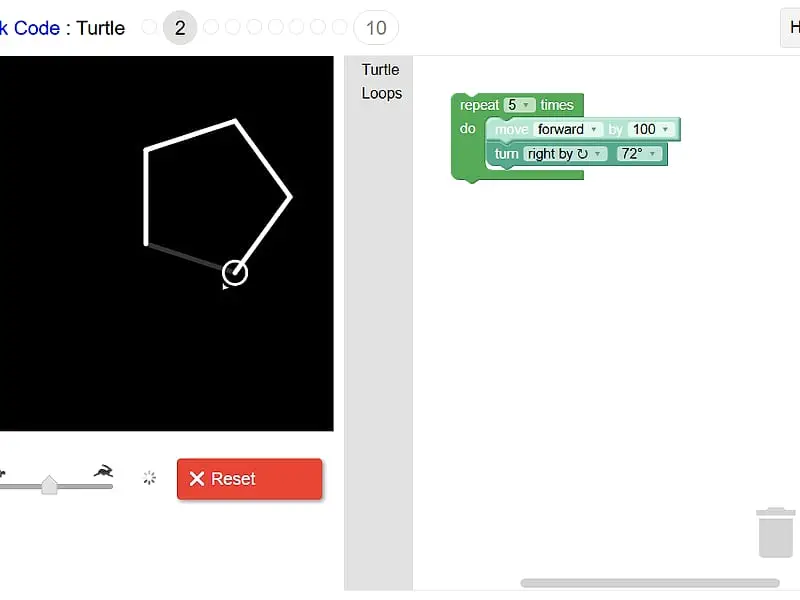
Tip: rotate your phone to landscape for a larger view.
What is Block Code Turtle Art?
Block Code Turtle Art is a coding game in which you program a turtle that trails a line behind it as it walks. You combine move, turn, repeat, pen and color blocks to copy a faint target picture on a black canvas. Ten levels lead from a simple square to stars and moons, ending with a free drawing level.
- Category
- Puzzle Games
- Players
- 1 player
- Plays on
- Best on desktop, playable on touch
- Input
- Mouse, Touch
- Made by
- Blockly Games by Google
- Checked
Block Code Turtle Art hands you a pen attached to a turtle and a black canvas to draw on. The turtle, shown as a small circle with a pointer, knows only a few commands: move forward, turn, lift or lower the pen, and change color. Each level fades in a ghostly guide image for you to copy. What makes it satisfying is the shortcut hiding in every shape, since a loop of two blocks can draw what would otherwise take dozens. It is part of Google’s Blockly Games and plays unblocked right here.
Drawing by Instructions
A one-line brief starts each stage, such as asking you to make a square appear. Choose blocks from the category list next to the workspace, stack them up, then hit Run Program. White lines appear as the turtle walks, and a slider decides how quickly: the turtle icon end is slow, the rabbit end is quick.
Cover the guide correctly and the stage counts as finished, with a pop-up revealing the JavaScript your blocks represent. Missed it? Hit Reset, tweak a value or shuffle the order, and give it another go.
The progression covers a lot of geometry in ten steps. You begin with four equal sides, then five. Next are stars made from a tiny number of blocks, a group of four stars placed at the corners of a square, and yellow stars linked by white lines. Later you build a full moon out of 360 white lines, then turn it into a crescent. Level 10 drops the guide entirely and fills the toolbox with extra categories, including logic, math, lists, variables and functions.
Block Code Turtle Art controls
| To do this | Mouse | Touch |
|---|---|---|
| Open a group of blocks | Click Turtle, Loops or another category name | Tap the category name |
| Assemble the drawing program | Drag blocks into the workspace and snap them together | Drag blocks with your finger |
| Adjust a distance, angle or color | Click the value on a block and pick a new one | Tap the value and pick a new one |
| Draw, or wipe the canvas | Click Run Program, then Reset | Tap Run Program, then Reset |
| Set how fast the turtle draws | Drag the slider between the turtle and rabbit icons | Slide the speed control |
The Geometry Behind Each Shape
Regular polygons. The turtle has to turn a full 360 degrees to face its starting direction again. Split 360 into as many parts as the shape has sides and that is your turn: 90 for a square, 72 for a pentagon, 60 for a hexagon. Put one move and one turn inside a repeat block set to the number of sides.
Stars. A star is a polygon that overshoots. With five points, each turn is 144 degrees, and the total of 720 degrees means the turtle loops twice around the center.
Shapes in a pattern. To place four stars at the corners of a square, put your star loop inside a second loop that moves the turtle along one side and turns 90 degrees. Use pen up before moving between stars, so no stray line connects them.
Curves and moons. Anything round needs many repetitions, which is why the moon levels lean on a 360-step loop. For the crescent, the trick is covering part of the moon with a black shape rather than drawing two curves.
When a picture comes out wrong, slow the turtle right down. Seeing each stroke appear one at a time shows you exactly which line veers off course.
Good for Art Fans and Math Fans Alike
The game appeals to two kinds of players: people who like making pictures, and people who like seeing why the numbers work. Both get a reward on the free level. If you enjoy creating images, Pixel Sketch Studio is a relaxed drawing tool, while Tangram keeps the focus on shapes and angles.
Block Code Turtle Art: questions players ask
What angle do I use to draw a star in Block Code Turtle Art?
For a five-point star, turn 144 degrees after each line and repeat five times. Its lines cut across each other, and those crossings form the points.
How do I pass the moon levels?
The hint explains that 360 white lines drawn together look like a full moon, so a repeat block set to 360 does the heavy lifting. For the crescent, the game asks you to add a black circle on top so part of the moon disappears.
My drawing looks right but the level will not pass. Why?
Your drawing is checked against the gray guide, so position and size matter, not just shape. Check that the turtle starts where expected and that your distances match the target, then run again.
Can I save a drawing I made on the last level?
This copy has no gallery, because it was removed along with server saving. If you want to keep a picture, take a screenshot of the canvas. Finished levels are still remembered in your browser.
Credits and license
Block Code Turtle Art was created by Blockly Games by Google and released as open source. FreezeNova hosts a lightly adapted copy on its own server, together with the original license file.
- Source code: github.com/google (original project)
- Code license: Apache-2.0
- Art & audio: Apache-2.0 (Google); finish sound by Jlew, CC BY 3.0
- Our changes: Renamed for FreezeNova. Analytics, server-side saving, the picture gallery, links to outside help and the other Blockly games were taken out. The drawing engine and all ten levels work as before.