Block Code Duck Pond Unblocked
Teach a rubber duck to aim, scan and swim, first with blocks and then with real JavaScript.
Tip: rotate your phone to landscape for a larger view.
What is Block Code Duck Pond?
Block Code Duck Pond is a programming puzzle where you write code for a rubber duck armed with a cannon and a scanner. Five battle challenges each appear twice, first solved with drag-and-drop blocks and then typed as JavaScript. The goal is to drain the opposing duck's health to zero.
- Category
- Puzzle Games
- Players
- 1 player
- Plays on
- Best on desktop, playable on touch
- Input
- Keyboard, Mouse, Touch
- Made by
- Blockly Games by Google
- Checked
Block Code Duck Pond turns a bathtub toy into a little combat robot. Your orange rubber duck floats in a square pond with a cannon, a scanner and a pair of paddling feet, and it does nothing until you program it. Every rival duck is a different problem to solve: one sits still, one drifts back and forth, one is too far away to hit. The unblocked version here comes from Google’s Blockly Games, and its neat trick is pairing each block puzzle with a typed JavaScript version of the same fight.
A Pond Fight in Code
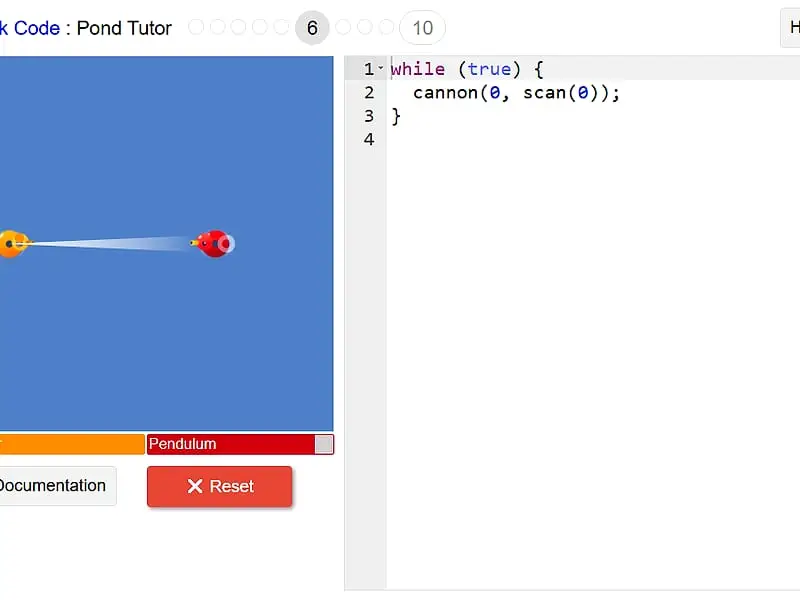
The pond fills the left of the screen, with a health bar under it for each duck. On block stages you drag commands from the Pond and Math categories and snap them into a script. On text stages you type the same commands into an editor with line numbers and syntax coloring.
Press Run Program and the battle plays out live. Once the opponent’s health reaches zero you win, and a message shows the JavaScript your blocks produced before you move on.
A few facts are worth knowing before you start:
| Detail | Value |
|---|---|
| Pond size | 100 by 100 meters |
| Cannon range | Up to 70 meters |
| 0 degrees | Points right (east) |
| 90 / 180 / 270 | Up / left / down |
The challenges grow in order. You start with a single aimed shot, then need a while loop for a sturdier target, then track a mover with scan. After that comes a distant duck you must swim toward, a level where you swim partway, stop and shoot, and finally a duck that flees when hit.
Block Code Duck Pond controls
| To do this | Keyboard | Mouse | Touch |
|---|---|---|---|
| Assemble your program from blocks | — | Drag blocks from the Pond and Math categories | Drag blocks with your finger |
| Type your program (JavaScript stages) | Type in the code editor | Click in the editor to place the cursor | — |
| Edit an angle or number value | Type the number and press Enter | Click the value and type a new one | Tap the value |
| Start or reset the fight | — | Click Run Program, then Reset | Tap Run Program, then Reset |
| Open the command reference | — | Click Documentation | Tap Documentation |
Thinking Like a Duck Programmer
Sketch the geometry. Before building, picture where the target sits relative to you. Directly above is 90, directly right is 0, and anything in between is a fraction of that. A rough angle is often enough at short range.
Let the scanner do the measuring. scan(angle) returns the distance to the nearest duck in that direction. Feeding it into cannon(angle, range) means the shell lands exactly where the enemy is, even when it moves.
Loop forever. One shell rarely finishes a fight. Putting your attack inside while (true) keeps your duck firing until the battle ends.
Respect the 70 meter limit. If a target is beyond range, swim first. Use loc_x, loc_y and speed from the Documentation panel to know when to stop.
Compare the two versions. After solving a block level, study the JavaScript it generated. The next level asks you to type that logic yourself, so the generated code is a ready-made hint.
Who Should Try It
This suits anyone curious about real programming but nervous about a blank editor. The battle view makes bugs obvious, since you can see your shell fall short or your duck wander off. Typing levels need a physical keyboard, so a laptop is the better choice than a tablet. For a gentler start with the same block system, try Block Code Maze, or move on to Elevator Saga when you want a pure JavaScript challenge.
Block Code Duck Pond: questions players ask
Is Block Code Duck Pond good for kids learning to code?
It works well for older kids and beginners. The first half of each pair uses colored blocks, so nobody has to worry about typing errors, and the second half shows how the same idea looks as real JavaScript.
How do I hit a duck that keeps moving?
Use the scan command to find the target's distance at a given angle, and pass that distance straight into the cannon command. Wrap both in a loop so the shot keeps updating as the other duck moves.
Why does my duck lose health when it swims into the target?
Collisions hurt both ducks. On the level where you must swim close, stop your duck before it touches the opponent, then fire from short range.
How many levels are there?
Ten. They form five challenges, and each challenge is played once with blocks and once with JavaScript, so the set ends with a duck that runs away after being hit.
Credits and license
Block Code Duck Pond was created by Blockly Games by Google and released as open source. FreezeNova hosts a lightly adapted copy on its own server, together with the original license file.
- Source code: github.com/google (original project)
- Code license: Apache-2.0
- Art & audio: Apache-2.0 (Google); sounds by jorickhoofd (CC BY 4.0) and soundscalpel.com (CC BY 3.0); hit sound made for this site, CC0
- Our changes: Given a new name for FreezeNova. We swapped out one sound that had no license, and removed analytics, saving to a server, outside help links and the rest of the Blockly Games set. All ten levels play as originally designed.