Robot Coder Unblocked
Write the whole program first. Once the robot rolls, there is no steering it.
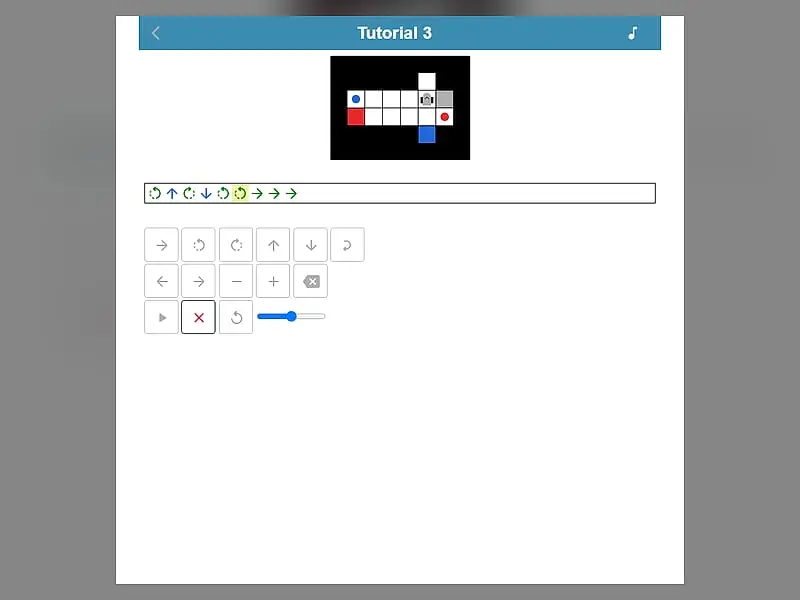
What is Robot Coder?
Robot Coder is a single-player programming puzzle. You build a list of commands for a small robot, such as step forward, turn, take and drop, then run the program without being able to change it mid-run. The goal is to carry every colored item to its matching target, ideally with as little code as possible.
- Category
- Puzzle Games
- Players
- 1 player
- Plays on
- Phone, tablet & desktop
- Input
- Keyboard, Mouse, Touch
- Made by
- Schnark
- Checked
Robot Coder turns programming into a planning puzzle. A small robot waits on a grid next to colored items and matching colored targets, and you have to write every instruction before it moves a wheel. When you press play, the program runs to the end with no chance to correct it. One step too many and the robot rolls into a wall. Schnark made it for the js13kGames contest in 2018, so the whole game fits in a tiny download, and it runs unblocked in any modern browser.
Commands, Items and Targets
Your program is a strip of symbols. The green arrow drives forward one square. The two curved arrows rotate the robot on the spot. The blue up and down arrows pick up and put down. Pickups and drops always act on the square directly in front of the robot, so it must face an item, not stand on top of it.
A level is complete when every item rests on a target of its own color. The robot can carry only one thing at a time, but nothing stops it from parking an item on a free square and coming back for it later.
Loops are the key to elegant code. A loop wraps a section of your program and repeats it between two and nine times. Four forward steps in a row become one loop with a count of four.
Robot Coder controls
| To do this | Keyboard | Mouse | Touch |
|---|---|---|---|
| Step forward | Underscore (_) | Click the forward arrow key | Tap the forward arrow key |
| Rotate left or right | < or > | Click a turn key | Tap a turn key |
| Pick up or put down | Up arrow picks up, Down arrow drops | Click the up or down arrow key | Tap the up or down arrow key |
| Wrap commands in a loop | Type 2 to 9, then + or - to adjust | Click the loop key, then plus or minus | Tap the loop key, then plus or minus |
| Move the cursor or erase | Left/Right arrows, Home, End, Backspace | Click the cursor or delete keys | Tap the cursor or delete keys |
| Start the run | Enter | Click play | Tap play |
Debugging Like a Programmer
Treat each failed run as information, not as a loss.
- Read the error. The game tells you whether the robot hit something, grabbed at nothing or dropped in the wrong place. That points straight at the faulty step.
- Slow the run down. A speed slider sits next to play, and the active symbol is highlighted as it runs. Watching at low speed shows exactly where your mental map and the real board disagree.
- Count facing, not just squares. After a left turn the robot faces a new way, and two turns spin it around completely. Many crashes come from losing track of direction.
- Solve first, then optimise. Get any program that works, save the checkmark, and only then hunt for repeated chunks you can fold into loops.
- Use temporary parking. Setting an item down out of the way can open a corridor the robot needs.
Who It Is For
Robot Coder is great for students meeting programming ideas for the first time and for experienced coders who enjoy code-golf style trimming. The command pad works with taps, so a phone held upright is enough, while desktop players can type programs on the real keyboard. Beeps for moving, turning and winning can be muted, and your shortest solution per level stays in your browser.
Once you finish the 24 levels, the editor lets you build maps up to 10 by 10 with walls, items and targets. For more puzzles that teach code thinking, try Block Code Maze or the elevator programming challenge in Elevator Saga.
Robot Coder: questions players ask
How many levels does Robot Coder have?
There are 24 levels in total. Three tutorials come first, then four themed groups hold the other 21 and unlock as you make progress. After five solves you also get a level editor for your own maps.
How do I get two stars in Robot Coder?
Each level has a target program length. Matching it gives one star and beating it gives two. Loops count toward the length too, but on routes with repeated moves they usually shrink your code enough to get under the target.
Why did my robot crash?
A run fails when the robot drives into a wall, item or target, tries to pick up from an empty square, drops something in the wrong spot or stops with work left. A message tells you which happened, and reset puts the level back.
Is Robot Coder good for learning to code?
It teaches the core habits well, like planning a sequence, tracing it in your head and spotting repetition you can turn into a loop. There is no text language to learn, so younger players can start right away.
Credits and license
Robot Coder was created by Schnark and released as open source. FreezeNova hosts an unaltered copy on its own server, together with the original license file.
- Source code: github.com/Schnark (original project)
- Code license: Apache-2.0
- Art & audio: Apache-2.0 (SVG tiles by the author, icons derived from Material Design Icons under Apache-2.0, synthesized sound effects)