Tiny Synth Piano Unblocked
Three rows of keys, four voices and four waveforms, all generated live in your browser.
What is Tiny Synth Piano?
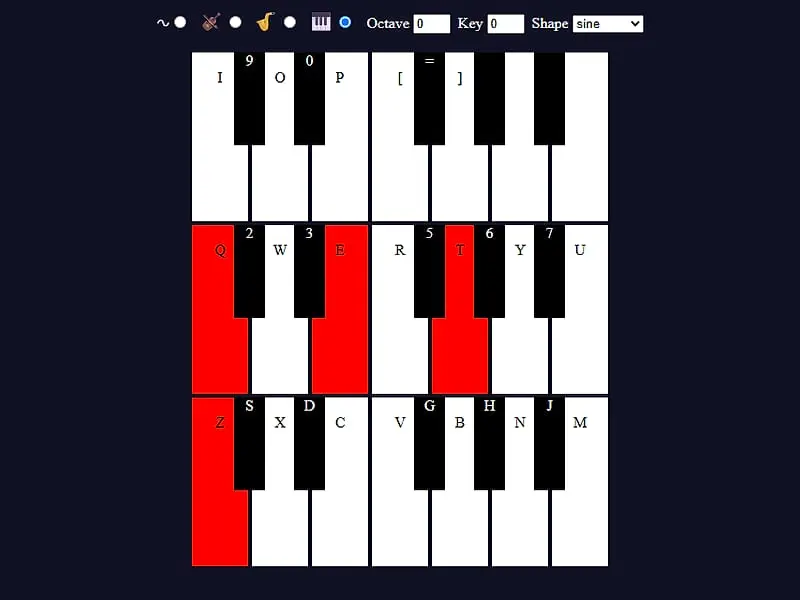
Tiny Synth Piano is a browser music toy with 36 keys laid out as three one-octave rows. You play notes with your computer keyboard, the mouse or touch, and pick from four synthesized voices and four wave shapes. There is no score or goal; the point is to noodle, practice melodies and hear how sound changes.
- Category
- Casual Games
- Players
- 1 player
- Plays on
- Best on desktop, playable on touch
- Input
- Keyboard, Mouse, Touch
- Made by
- Frank Force
- Checked
Tiny Synth Piano grew out of a coding stunt: Frank Force originally wrote a playable piano, 1Keys, in roughly one kilobyte of JavaScript. This expanded build keeps that spirit but adds labels on the keys, a choice of voices and wave shapes, plus octave and transpose controls. Nothing here is a recording. Every tone is built on the spot by your browser, which is why it reacts the instant you press a key. You can play it unblocked here on FreezeNova and use your own keyboard like a little workstation.
Three Rows, Three Octaves
The screen shows 36 keys stacked in three rows. Each row is one octave, and the lowest pitches sit at the bottom, the opposite of how many people expect at first.
The mapping copies the shape of a real keyboard. In the bottom letter row, Z is a low C, and the keys just above it (S, D and so on) are the sharps and flats. The Q row with the number keys above it repeats that pattern one octave up. The top octave starts at I and runs out to the bracket keys. Your keyboard simply runs out of keys near the top right, so the last few notes have no letter and need a click or a tap.
A pressed key turns red while it sounds. When you let go, the note fades over a split second instead of cutting off, so there are no harsh clicks.
Tiny Synth Piano controls
| To do this | Keyboard | Mouse | Touch |
|---|---|---|---|
| Notes in the bottom (lowest) row | Z S X D C V G B H N J M | — | — |
| Notes in the middle row | Q 2 W 3 E R 5 T 6 Y 7 U | — | — |
| Notes in the top row | I 9 O 0 P [ = ] | — | — |
| Sound a key, or sweep across several | — | Hold the button on a key, or drag over keys with it held | Press and hold a key |
| Switch voice, waveform, octave or transpose | — | Click the voice icons, the Shape menu, or the Octave and Key arrows | Tap the same buttons and arrows |
Shaping the Sound
The row of small icons at the top picks the voice. You start on the organ (the piano icon), and the others give you brass, strings and a bare sine tone. The Shape menu then swaps the waveform under whichever voice you chose: sine is round and soft, triangle is a little brighter, square sounds hollow and retro, and sawtooth buzzes.
A quick way to learn the palette is to hold one middle C and step through all four shapes on each voice. That is sixteen sounds from a single key.
Ideas for Playing
- Bass and chords. Drop Octave by one, keep a slow bass line on the Z row with your left hand, and lay chords on the Q row with your right.
- Fast runs. The comma, L, period, semicolon and slash keys double up the first notes of the middle row, so you can roll a scale without crossing your fingers.
- Transpose, don’t relearn. If a melody sits too low, nudge the Key box instead of moving your hands.
- Glissando. Hold the mouse button and drag across a row for a sweeping slide.
- Phone tip. On a phone it works, but the keys are small. Turn the screen sideways and use two thumbs.
Who Will Enjoy It
This is a toy, not a lesson app, and that is the charm. Music students can test intervals during a free period, and anyone curious about synthesizers can hear how a square wave differs from a sine wave without buying gear. Kids tend to love the instant feedback.
If you want something with a goal after your jam, the Block Code Music puzzle turns notes into a coding challenge, and the full casual games list has more low-pressure picks.
Tiny Synth Piano: questions players ask
Can I play Tiny Synth Piano on a school Chromebook?
Yes. It is a single small page with no downloads, and all of the sound is made by the browser's Web Audio engine. Click the piano once so the browser allows audio, then use the letter rows of the Chromebook keyboard.
How many notes can I hold down at the same time?
Each note runs as its own voice, so you can stack several into a chord. Your computer keyboard may limit how many keys it reports at once, but on a touch screen you can press several keys with different fingers.
How do I play a song in a different key?
Use the arrows on the Key box. Each step shifts every note by a half step, up to twelve either way, so you can keep the same finger pattern and hear the tune higher or lower. The Octave arrows jump a whole octave at a time.
Why did all my notes stop when I switched tabs?
The piano lets go of every note as soon as its window loses focus. That stops notes from droning on forever. Click back on the page and keep playing.
Does it record or save what I play?
No. It is a live instrument only, with no recording, playback or save feature. If you want to keep an idea, write the letter keys down or capture your screen with sound.
Credits and license
Tiny Synth Piano was created by Frank Force and released as open source. FreezeNova hosts a lightly adapted copy on its own server, together with the original license file.
- Source code: github.com/KilledByAPixel (original project)
- Code license: GPL-3.0
- Art & audio: GPL-3.0 (all sound synthesized with the Web Audio API, no image or audio files)
- Our changes: We gave the page a new title, added touch support, and made the audio wake up on the first note you play. The synth engine itself is untouched.
- Corresponding source: download