Block Code Maze Unblocked
Snap a few blocks together, press Run and see whether your astronaut finds the flag.
Tip: rotate your phone to landscape for a larger view.
What is Block Code Maze?
Block Code Maze is a beginner coding puzzle in ten levels. You drag blocks such as move forward, turn, repeat until and if path into a stack, and an astronaut follows that program through a maze of pipes. The goal is to reach the red flag, often while staying under a strict block limit.
- Category
- Puzzle Games
- Players
- 1 player
- Plays on
- Best on desktop, playable on touch
- Input
- Mouse, Touch
- Made by
- Blockly Games by Google
- Checked
Block Code Maze is about the moment a program clicks. You stack a few bright puzzle-piece blocks, press Run, and a small astronaut walks along white pipes exactly as you told it, including straight into a wall if you got it wrong. There is nothing to type and no syntax to memorize. Over ten levels, the game sneaks in the ideas behind real code: sequences, loops and decisions. It comes from Google’s Blockly Games and plays unblocked in any modern browser.
From Steps to Smart Programs
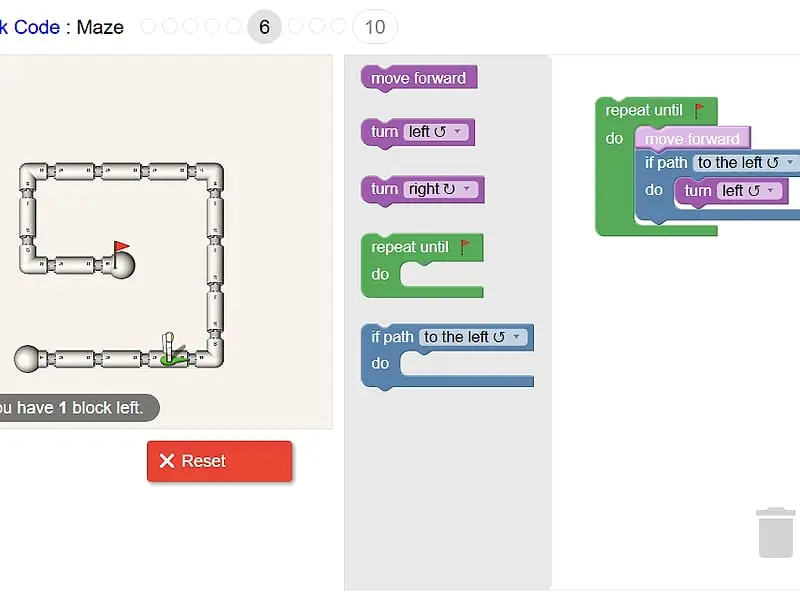
The maze sits on the left with the astronaut and a red goal flag. On the right are a gray toolbox and a white workspace. Drag blocks into the workspace and connect them top to bottom; that stack is the whole program.
Pressing Run Program makes the astronaut carry out the blocks in order. Reach the flag and a message celebrates the win and shows the JavaScript your blocks became, such as moveForward(); lines tucked inside a while loop. Hit a wall and the astronaut does a short spin, after which you reset and try again.
The levels unlock new tools one at a time:
- Levels 1 and 2 need only “move forward” and the two turn blocks.
- Next comes “repeat until”, which lets one loop replace a long column of steps.
- Then “if path” checks whether a route is open ahead, left or right.
- Later “if-else” chooses between two actions, which is what the hardest mazes need.
A number in the corner of many mazes shows how many blocks you may still add. When it hits zero, you must delete something before you can take a new block.
Block Code Maze controls
| To do this | Mouse | Touch |
|---|---|---|
| Pull a block into your program | Drag it from the gray toolbox into the white workspace | Drag it with your finger |
| Snap blocks together | Drop a block just under or inside another until it clicks in place | Drop it under or inside another block |
| Throw a block away | Drag it onto the trash can or back to the toolbox | Drag it onto the trash can |
| Pick a different direction | Click the small drop-down arrow on the block | Tap the drop-down arrow |
| Run the program or reset the maze | Click Run Program, then Reset | Tap Run Program, then Reset |
| Switch levels | Click a dot or number at the top | Tap a dot or number |
Common Mistakes and How to Fix Them
Mixing up left and right. Turns follow the astronaut’s own point of view. When it is walking down the screen, its left is your right. Rotate the screen in your head, or follow the path with a finger as if you were the astronaut.
Building long chains. If you run out of blocks, the level is hinting that a pattern repeats. Find the shortest chunk that repeats, such as “forward, turn left”, and drop it inside a loop.
Testing too late. Run the program after every few blocks. Watching where the astronaut stops tells you exactly which block is wrong.
Planning for one maze only. The final levels are easier with a general rule than with exact steps. A program that keeps moving and turns whenever a side path opens will find its way through mazes you have not even studied.
Why It Works as a First Coding Game
The feedback is instant and visual, so mistakes feel like puzzles rather than failures. Once the loops make sense, Block Code Turtle Art applies them to drawing shapes, and Robot Coder offers another step-by-step programming challenge on FreezeNova.
Block Code Maze: questions players ask
What is the answer to the last Block Code Maze level?
The final mazes reward a wall-following program rather than a list of steps. Repeat until you reach the goal, move forward, and use an if-path block to turn whenever an opening appears on one chosen side. Keeping to one side guides the astronaut through.
What age is Block Code Maze for?
It needs no reading of code and no typing, so younger players can start on their own, while the later loop and decision levels still make adults stop and think.
Can I go back and replay an earlier maze?
Yes. The dots and numbers across the top let you jump to any level, and solved ones stay filled in because your progress is stored in your browser.
Does it work on an iPad?
Blocks can be dragged with a finger, so a tablet held sideways is playable. A phone screen is cramped because the maze and the workspace sit side by side.
Credits and license
Block Code Maze was created by Blockly Games by Google and released as open source. FreezeNova hosts a lightly adapted copy on its own server, together with the original license file.
- Source code: github.com/google (original project)
- Code license: Apache-2.0
- Art & audio: Apache-2.0 (Google); win sound by grunz, CC BY 3.0; goal flag drawn for this site, CC0
- Our changes: Renamed for FreezeNova. We kept only the astronaut character and drew a new goal flag, and we removed analytics, server saving, outside help links and the other Blockly games. The ten mazes have not been changed.