Dots and Boxes Unblocked
The notebook-margin classic, where the player who opens the long chain usually loses it.
What is Dots and Boxes?
Dots and Boxes is a two-player game played on a grid of dots. On each turn you draw one short line between neighboring dots, and if your line completes a square you claim it and move again. When every line is drawn, the player who owns more squares wins.
- Category
- Strategy Games
- Players
- 1–2+ players (same screen)
- Plays on
- Phone, tablet & desktop
- Input
- Mouse, Touch, Keyboard
- Made by
- Christopher Müller
- Checked
Dots and Boxes looks like doodling, yet it hides one of the neatest strategy ideas in any pencil game. Each turn you add a single line between two dots. Close the fourth side of a square and you own it and draw again, which means one good line can snowball into a long streak. The catch is that most lines you draw also set up your opponent. This unblocked version is Christopher Müller’s clean black-and-white take from his PaperGames project, with a three-level AI and a local two-player mode.
Rules at a Glance
- Choose a board of 4x4, 5x5, 6x6 or 8x8 boxes. The default is 6x6.
- Player 1 always opens. Each turn, draw one horizontal or vertical line between two dots that sit next to each other. A line can only be drawn once.
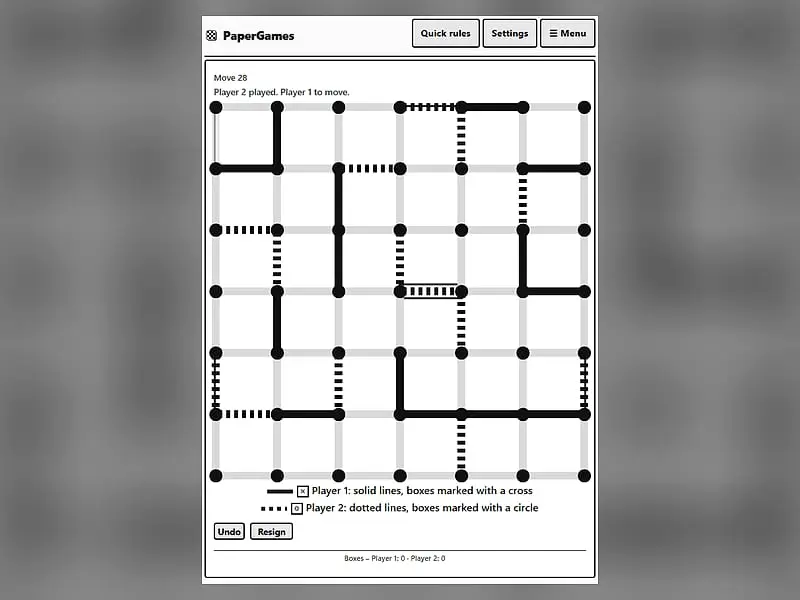
- If your line completes a box, the box is yours. It is stamped with a cross for Player 1 or a circle for Player 2, and you must draw another line.
- The turn passes as soon as you draw a line that completes nothing.
- When the grid is full, more boxes wins. An equal split is a draw.
Against the AI you may play first or second, and Undo walks back through earlier moves if you want to study a mistake.
Dots and Boxes controls
| To do this | Keyboard | Mouse | Touch |
|---|---|---|---|
| Add a line to the grid | Arrow keys to reach a line, Enter to draw it | Click the gap between two neighboring dots | Tap the gap between two neighboring dots |
| Set up a match with the computer | — | Click "vs Computer", pick Player 1 or 2, a level and a grid size, then click "New game" | Tap "vs Computer", pick Player 1 or 2, a level and a grid size, then tap "New game" |
| Play someone sitting next to you | — | Click "2 Player (local)" | Tap "2 Player (local)" |
| Step back one move | — | Click "Undo" | Tap "Undo" |
| Change display and speed options | — | Click "Settings" | Tap "Settings" |
Thinking in Chains
Beginners play box by box. Stronger players think about the shape of the whole board. Here is the progression most people go through.
Stage one: do not give away third sides. Any line that leaves a box with three sides drawn is a gift. Before clicking, look at both boxes that line touches.
Stage two: play safe lines as long as possible. In the opening, keep every box at two sides or fewer. The longer you can do this, the more the board’s final structure is decided by you.
Stage three: notice chains. Eventually, all safe lines run out. The board is then made of corridors of boxes, each with two sides drawn. Open one and your opponent can take the whole corridor in a row.
Stage four: sacrifice small. When you have to open something, offer the shortest chain available. A two-box chain costs you two boxes. A nine-box chain costs you the game.
On the bigger grids, keep a mental tally of how many long chains exist and how long each is. That count often settles the result many moves before the end.
How the AI Plays
The Easy computer draws random lines, so it is good for learning the rules. Medium grabs any box it can and avoids handing one over. Hard does the same and, once every line would give something away, picks the move that lets you take the fewest boxes back. Settings let you change text size, contrast, spacing and how fast the AI answers.
If you enjoy quiet two-player thinking games, Game of the Amazons also squeezes the board until someone runs out of room. You will find more in card and board games.
Dots and Boxes: questions players ask
Is there a winning strategy for Dots and Boxes?
Not a simple one, but there is a key idea. Late in the game the board breaks into chains of boxes. Whoever is forced to open those chains tends to lose, so experienced players count chains early and steer the parity in their favor.
How do I beat the Hard computer in Dots and Boxes?
Hard never hands you a box by accident and always opens the smallest group when it must. To beat it, avoid giving away third sides, then try to arrange the board so it runs out of safe lines before you do.
Can two people play Dots and Boxes on one phone?
Yes. Choose '2 Player (local)' and pass the phone back and forth. Player 1 draws solid lines and marks boxes with a cross, while Player 2 uses dotted lines and circles, so it is always clear who owns what.
Will my game still be there if I refresh?
Yes. A game in progress is stored in your browser and returns after a reload, so you can close the page mid-match and pick it back up on the same device.
Credits and license
Dots and Boxes was created by Christopher Müller and released as open source. FreezeNova hosts a lightly adapted copy on its own server, together with the original license file.
- Source code: github.com/YourChaosChris (original project)
- Code license: MIT
- Art & audio: MIT (grid, lines and marks drawn with HTML and CSS, no image or audio files)
- Our changes: Out of the PaperGames set we kept this one game, in English. Its offline service worker, language switcher and links to the other games and site pages are gone. The rules and the AI are untouched.