CSS Grid Carrot Patch Unblocked
Water the carrots, poison the weeds, and learn CSS grid one line number at a time.
Tip: rotate your phone to landscape for a larger view.
What is CSS Grid Carrot Patch?
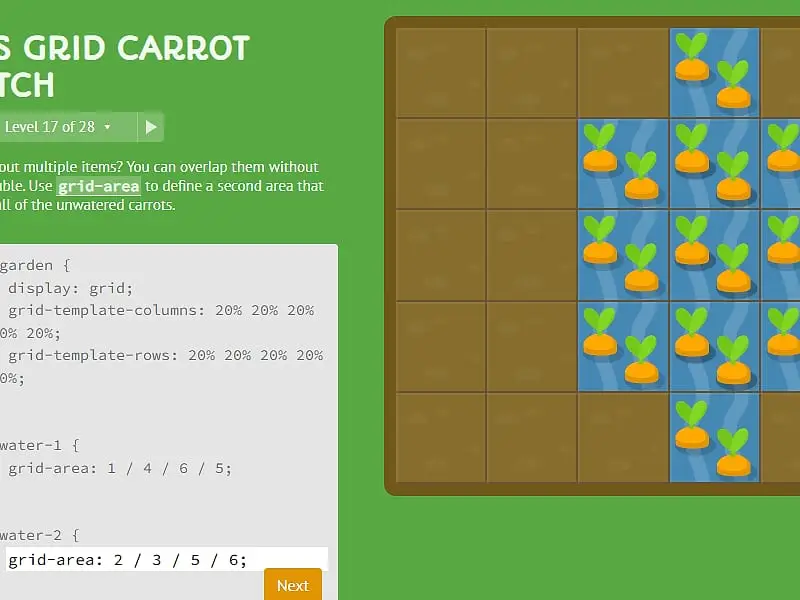
CSS Grid Carrot Patch is a coding game that teaches CSS grid layout. A five-by-five garden holds carrots and weeds, and you write CSS properties that place water over carrots or poison over weeds. Across 28 levels you learn grid lines, spans, shorthands, ordering and grid templates.
- Category
- Puzzle Games
- Players
- 1 player
- Plays on
- Phone, tablet & desktop
- Input
- Keyboard, Mouse, Touch
- Made by
- Thomas Park
- Checked
CSS Grid Carrot Patch teaches the most powerful layout tool in modern web design using a vegetable plot. That plot is a genuine grid container, five squares by five, with some carrots and weeds growing in the soil. Your CSS places a patch of water or poison, and the patch shifts as you type, so you see the effect of every number instantly. Grid line numbers and spans that seem abstract in documentation become obvious when a puddle slides two squares to the left. Thomas Park’s game plays unblocked here.
Planting the Code
Each level has three parts: a short lesson on the left, a code box with most of the stylesheet already filled in, and the garden. You type the missing declarations. When the water sits precisely over the carrots, or the poison precisely over the weeds, Next becomes clickable, and pressing it shows the treated plants before the following lesson appears.
The answer checker is flexible. It looks at the result, not your wording, so any valid CSS that puts each patch in the right place and at the right size is accepted.
Here is the path the 28 levels follow:
- Start and end lines.
grid-column-startandgrid-column-end, including negative numbers that count from the far edge. - Span. Set a width with
spaninstead of naming an end line. - Shorthands.
grid-columnandgrid-rowcombine start and end;grid-areasets all four at once. Some levels use two overlapping patches. - Order. The
orderproperty moves items that were placed automatically. - Templates.
grid-template-columns,grid-template-rowsand thegrid-templateshorthand redraw the grid itself, using percentages, pixels, ems,repeat()andfrunits.
Clear level 28 and a brief victory screen appears.
CSS Grid Carrot Patch controls
| To do this | Keyboard | Mouse | Touch |
|---|---|---|---|
| Enter your CSS | Type in the code box | — | Tap the code box and use the on-screen keyboard |
| Hand in a working answer | Enter on the last line, or Ctrl + Enter | Click "Next" once it lights up | Tap "Next" |
| Choose any level | — | Click the level counter, then a level number, or use the side arrows | Tap the level counter, then a level number |
| See notes on a property | — | Point at a highlighted property name in the instructions | — |
Getting the Numbers Right
The biggest hurdle for newcomers is line numbering. Picture the fences between garden beds rather than the beds. A patch that covers the second, third and fourth columns starts at fence 2 and ends at fence 5, written grid-column: 2 / 5.
When you know how wide a patch should be but not where it ends, span is cleaner. grid-row: 3 / span 2 means “start at line 3 and cover two rows”.
The grid-area shorthand trips up many people because of its order, which begins with the row start, then the column start, then the two end lines in that same order. That is not the top, right, bottom, left order used by margins and padding, so write it out slowly the first time.
In the template levels, think of fr as “a share of the leftover space”. Fixed sizes like 50px are subtracted first, and whatever remains is divided by the fractions.
Finally, point at any highlighted property name in a lesson. A tooltip lists the values that property accepts, which often hints at the answer.
Where to Go Next
This is a natural follow-up to CSS Diner, which covers selectors, and a companion to Flexbox Lily Pond, which handles one-dimensional layout. Grid layout is where many front-end learners finally feel in control of a page.
CSS Grid Carrot Patch: questions players ask
Do I need to know CSS to play CSS Grid Carrot Patch?
Basic familiarity helps, since you type property and value pairs, but the game explains each grid property as it appears. The rest of the CSS is prefilled, so each level asks for just a line or two.
Why does grid-column 1 / 3 only cover two squares?
The numbers refer to the lines between cells, not the cells themselves. Starting at line 1 and ending at line 3 spans the two columns in between. A five-column garden has six lines.
What does a negative line number mean?
Negative numbers count backward from the right or bottom edge. In this garden, -1 is the last line, so grid-column-end set to -1 stretches a patch all the way to the right side.
Will my answers still be there if I come back later?
Yes. Your current level, everything you typed and the levels you solved are stored in your browser. To wipe them, use Reset inside the level list.
Credits and license
CSS Grid Carrot Patch was created by Thomas Park and released as open source. FreezeNova hosts a lightly adapted copy on its own server, together with the original license file.
- Source code: github.com/thomaspark (original project)
- Code license: MIT
- Art & audio: MIT (garden, carrot and weed drawings by the author); PT Sans, Autour One and Source Code Pro fonts under SIL OFL 1.1
- Our changes: Renamed for FreezeNova. We dropped analytics and links to the author's paid game site, host the fonts ourselves and kept only the English text. Levels and answer checking have not changed.