Shogi Unblocked
Every capture becomes a reinforcement. Mate the enemy King before your own pieces come back to haunt you.
What is Shogi?
Shogi is Japanese chess, played on a 9x9 board by two players. Unlike Western chess, every piece you capture becomes yours to place back into the game later. Pieces that reach the enemy's three ranks may promote, and you win by trapping the rival King in checkmate.
- Category
- Strategy Games
- Players
- 1–2+ players (same screen)
- Plays on
- Phone, tablet & desktop
- Input
- Mouse, Touch, Keyboard
- Made by
- Christopher Müller
- Checked
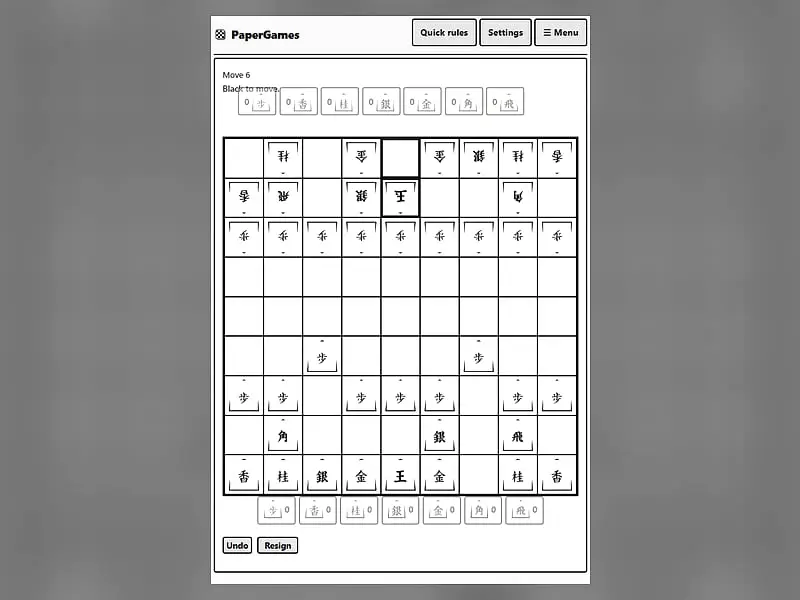
Shogi is what you get if chess never lets anyone leave. When you take an enemy piece in Shogi, it does not go to a graveyard; it switches allegiance and sits on your side of the table until you choose to bring it back into play for your army. That single rule keeps the board full and the attacks sharp right up to the end. This unblocked Shogi belongs to the PaperGames set by Christopher Müller, drawn with the traditional wedge-shaped tiles and brush-style kanji. Take Sente or Gote against a three-level AI, or pass the screen between two players.
Moves, Drops and Promotion
Sente, the Black side, has the first turn and starts at the near edge. You win by checkmating the opposing King, so that it is under attack and nothing can save it.
A turn is one of two things:
- Move a piece already on the board, capturing if it lands on an enemy.
- Drop one of your captured pieces onto a vacant square, which uses the whole turn.
Pieces lose their promotion when captured, and the strips at the top and bottom of the screen show each player’s captured stock with counts.
The cast
| Piece | How it moves |
|---|---|
| King | One square any direction |
| Gold general | One square orthogonally or diagonally forward |
| Silver general | One square diagonally or straight forward |
| Knight | Two forward and one to the side, jumping |
| Lance | Any distance straight ahead |
| Rook and Bishop | Long slides, as in Western chess |
| Pawn | One square forward, capturing the same way |
Entering, leaving or moving within the far three ranks gives a piece the option to promote. A promoted Rook or Bishop adds one-step moves in its missing directions. Silvers, Knights, Lances and Pawns all promote to Gold-like movers. When staying unpromoted would leave a piece with no legal moves ever again, promotion is automatic.
Shogi controls
| To do this | Keyboard | Mouse | Touch |
|---|---|---|---|
| Move a piece already on the board | Tab to the board, arrow keys to reach a square, Enter on your piece and again on the target | Click your piece, then the square it should move to | Tap your piece, then the target square |
| Play a piece from your hand | — | Click the piece in your hand row, then an empty square | Tap the piece in your hand row, then an empty square |
| Accept or refuse promotion | — | Click "Promote" or "Don't promote" when asked | Tap "Promote" or "Don't promote" when asked |
| Pick your side and the AI level | — | Pick the side and a level, then click "New game" | Pick the side and a level, then tap "New game" |
| Take back a move or concede | — | Click "Undo" or "Resign" | Tap "Undo" or "Resign" |
How to Stop Losing Quickly
Castle first. Shift your King toward one flank and surround it with your generals before you start any attack. An exposed King in Shogi dies fast because of drops.
Count what is in hand. A Silver in your opponent’s hand can appear beside your King next turn. Before every trade, ask what the other side gains in their hand.
Look at empty squares near the King. Each one is a possible drop point. Filling key gaps with defenders is often worth a tempo.
Use pawn trades to open files. A pawn swap gives you a spare pawn to drop later and clears a lane for your Rook.
Promote with thought. Unpromoted Silvers and Knights keep their original moves, which are sometimes more useful. The game always asks, so decide case by case.
Levels and Learning
The Easy AI plays whatever legal action comes up at random, Medium thinks one turn deep, and Hard spends a moment searching through board moves and drops alike. Undo, Resign and auto-saving make it easy to study. Chess players looking for a cousin with a river and cannons should try Xiangqi, and the Western game is available as Chess vs Computer.
Shogi: questions players ask
How is Shogi different from chess?
The board is 9x9, most pieces move only a short way, and promotion happens in the last three ranks. The biggest change is the drop: captured pieces go to your hand and can re-enter the game as your own, so the board never empties out.
Can I learn Shogi if I cannot read kanji?
Yes, with a little patience. Each tile's shape points toward the opponent, and promoted pieces show a different character. Using Undo to test how a piece moves is a quick way to match each symbol to its pattern.
Are there illegal drops in Shogi?
A few. A pawn or lance may not land on the far rank, and a knight may not land on either of the two far ranks, because those pieces would be stuck. You cannot place a second unpromoted pawn in a column, and a pawn drop may not deliver checkmate.
What happens if the same position keeps repeating?
If an identical position, including both hands and whose turn it is, shows up four times, the result is a draw. If one player was checking on every move of that cycle, that player loses instead.
Credits and license
Shogi was created by Christopher Müller and released as open source. FreezeNova hosts a lightly adapted copy on its own server, together with the original license file.
- Source code: github.com/YourChaosChris (original project)
- Code license: MIT
- Art & audio: Board and piece shapes: MIT. Piece kanji: CC BY 4.0, adapted by Christopher Müller from the kanji_light shogi piece set by Kadagaden (github.com/Kadagaden/shogi-pieces)
- Our changes: We run the PaperGames Shogi page on its own in English, without the service worker, language option or links to the wider site, and we added the license and credits for the piece art. Game rules and AI are unmodified.