Chess vs Computer Unblocked
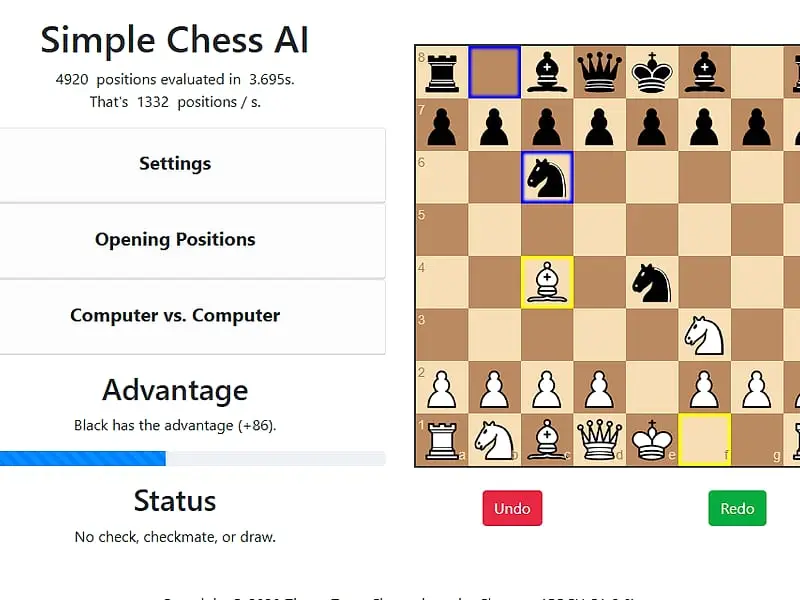
You play White, the engine plays Black, and a score bar shows who is really winning.
Tip: rotate your phone to landscape for a larger view.
What is Chess vs Computer?
Chess vs Computer is a browser chess game in which you play White against a minimax engine with adjustable search depth. You drag pieces to make moves, and the engine replies as Black. The goal is to checkmate its king, using optional hints, undo and a live evaluation bar to guide you.
- Category
- Card & Board Games
- Players
- 1 player
- Plays on
- Best on desktop, playable on touch
- Input
- Mouse, Touch
- Made by
- Zhang Zeyu
- Checked
Chess vs Computer is a compact chess program by Zhang Zeyu that shows its thinking instead of hiding it. After each reply, it tells you how many positions it examined, how long it took and how many positions per second it managed, while a bar beside the board swings toward whichever side is ahead. That makes it a handy practice partner: you can turn the engine up or down, ask for a hint, take moves back and see the evaluation change. Play it unblocked here without installing anything.
What Happens on the Board
You are White and you move first. Drag a piece to its square and release it; if the move is illegal, the piece simply returns. With a mouse, hovering over a piece shades the squares it can legally reach.
Black’s answer comes from a minimax search with alpha-beta pruning. The engine scores positions using piece values plus tables that reward good squares, so it cares about development and centralization, not only material.
Every standard rule is in place, including castling and en passant. A yellow frame marks your last move and a blue frame marks the reply. Below the advantage bar, a status line warns you about check and announces how the game finished: checkmate, stalemate, threefold repetition, the 50-move rule or insufficient material.
Chess vs Computer controls
| To do this | Mouse | Touch |
|---|---|---|
| Make a move | Drag the piece to its new square | Drag the piece to its new square |
| See where a piece can go | Hover over one of your pieces | — |
| Take back your move and Black's answer | Click "Undo" | Tap "Undo" |
| Step forward again after undoing | Click "Redo" | Tap "Redo" |
| Adjust engine strength or hints | Open "Settings" and pick a value or tick the box | Open "Settings" and pick a value or tick the box |
| Jump to an opening or reset the board | Open "Opening Positions" and click a button | Open "Opening Positions" and tap a button |
A Training Plan That Works
- Find your depth. Begin at depth 1 or 2 and win a few games before moving up. Every extra level of depth makes the engine noticeably sharper and a bit slower to reply.
- Treat the bar as an alarm. If the advantage swings hard toward Black right after your move, something is hanging. Undo and look again.
- Rehearse openings. The opening buttons load the Ruy Lopez, the Italian Game or the Sicilian Defense. Starting from those positions lets you practice the middle game that follows.
- Compare ideas. Undo takes back both your move and Black’s reply. Try two candidate moves in turn and see which one the bar prefers.
- Ask for help sparingly. The suggested-move outline is useful when you are lost, but you will learn more by guessing first and checking second.
- Mind promotion. Pawns always become queens, so a sudden extra queen can stalemate a lonely king if you are careless.
Best Uses for This Engine
This is not a polished chess site with ratings and online opponents. It is a focused sparring board, and that is its strength. Beginners can set it low and win, intermediate players can push it to depth 4 or 5 and get a real fight, and curious players can run Computer vs. Computer to see how search depth changes the play.
For other strategy games with different pieces and rules, try Xiangqi or Shogi. If you want something lighter, Checkers uses a similar board with far fewer rules.
Chess vs Computer: questions players ask
What is the easiest level in Chess vs Computer?
Set the search depth to 1 in Settings. At that depth the engine only considers its own next move, so it misses most threats. Depth 3 is the starting setting, and depth 5 is the strongest and slowest.
Can I choose to play Black instead of White?
No, you always take White and move first. If you want to watch Black's side in action, the Computer vs. Computer option lets the engine play both colors, each with its own depth.
Why did my pawn turn into a queen automatically?
This version promotes every pawn that reaches the last rank to a queen, for both players. There is no menu for a knight, rook or bishop, so watch out for stalemates when a new queen appears.
Can I play chess against the computer on an iPad or phone?
You can drag pieces with a finger, but on narrow screens the settings panels stack above the board and you have to scroll inside the game area to reach it. A tablet held sideways or a laptop is more comfortable.
How do I get a hint when I am stuck?
Tick the suggested-move box in Settings. The engine then searches from White's side and draws a red outline around the start and end squares of the move it prefers. You are still free to play something else.
Credits and license
Chess vs Computer was created by Zhang Zeyu and released as open source. FreezeNova hosts a lightly adapted copy on its own server, together with the original license file.
- Source code: github.com/zeyu2001 (original project)
- Code license: MIT
- Art & audio: CC BY-SA 3.0 (chess piece images by Cburnett, Wikimedia Commons); chessboard.js, jQuery and Bootstrap are MIT; chess.js is BSD-2-Clause
- Our changes: The five web libraries the game needs are now served from our own server. We also removed unused icon fonts and a footer link, widened the layout slightly, and fixed a bug where the engine kept trying to move after checkmate. The engine itself was not changed.