IsoCity Unblocked
A pocket-sized town planner with no budget, no timer and nothing to lose.
Tip: rotate your phone to landscape for a larger view.
What is IsoCity?
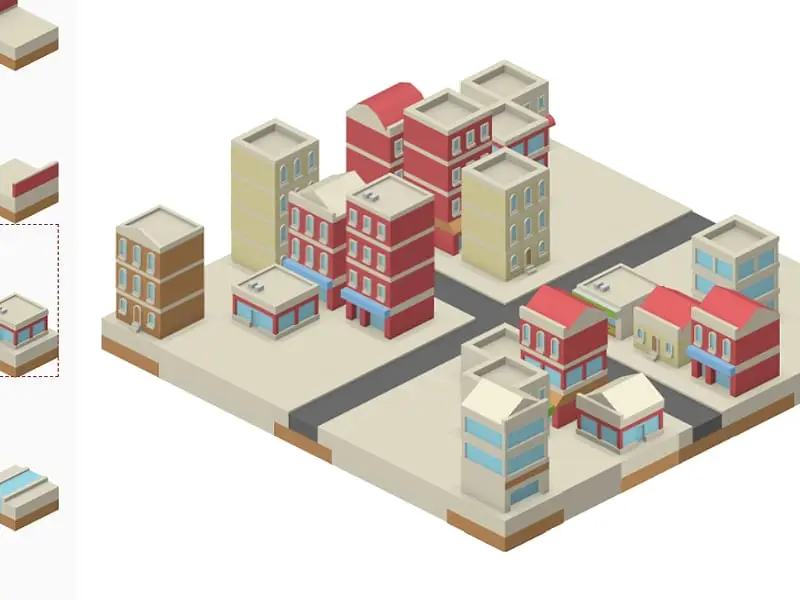
IsoCity is a relaxed isometric town-building sandbox. You pick tiles such as roads, canals, walls and buildings from a palette and place them on a 7x7 grid. There is no money, score or failure; the goal is simply to design a little town that looks the way you want.
- Category
- Strategy Games
- Players
- 1 player
- Plays on
- Phone, tablet & desktop
- Input
- Mouse, Touch
- Made by
- Victor Ribeiro
- Checked
IsoCity is the opposite of a stressful city builder. There are no taxes, no traffic jams and no angry citizens, only a 7x7 square of empty ground and a long list of colorful tiles to paint onto it. You pick a straight road, a corner shop or a stretch of canal and drop it where you like, and the isometric view turns your clicks into a little diorama. Victor Ribeiro wrote this open-source toy, using free art from Kenney’s tile library, and it runs unblocked on computers and tablets alike.
Building Your Block
Pick a piece in the palette on the left, then click a square on the map. The new tile replaces whatever stood there. With a mouse, hold the button and sweep across the grid to paint the same tile over a row of squares, which is the fastest way to lay a long street.
The palette is loosely grouped. Up top are straight road pieces in two directions, crosswalks, tree-lined avenues, a roundabout and crossroads. Below those come curves, bends and dead ends. Then you reach water channels and red wall sections, and finally the buildings: small corner stores, brick apartments and glassy office towers.
Changed your mind? Right-click to wipe a square back to bare ground, or on touch screens choose the plain ground tile and tap. Nothing is permanent, so you can tear up a district and start over in seconds.
A shaded diamond follows your pointer to show exactly which square the next click will change.
IsoCity controls
| To do this | Mouse | Touch |
|---|---|---|
| Choose a tile | Click it in the palette (scroll the palette for more) | Tap it in the palette |
| Drop the tile on the map | Click a square on the map, or hold the button and drag to paint | Tap a square on the map |
| Reset a square to bare ground | Right-click it | Pick the plain ground tile (first in the palette) and tap the square |
Design Ideas That Look Good
- Sketch the roads first. Tall buildings can hide tiles behind them. Get the street plan right before you fill the blocks.
- Put height at the back. Tiles lower on screen are drawn over those behind them, so a tower in front can hide the shops you just placed.
- Read the road ends. Each road tile opens in fixed directions. Check the palette picture before you place a piece beside another road.
- Frame a park with water. A strip of canal makes a neat border for a green space or a row of waterfront shops.
- Vary the skyline. Alternate low storefronts with taller blocks so the town does not look like one flat wall.
- Wipe in one stroke. Drag the plain ground tile across an area to clear it quickly.
A Calm Break Between Harder Games
IsoCity works well as a cool-down after a tense match, or as a small creative project you return to over several days, since the layout is saved. It also makes a fun planning exercise: try building a town where every road connects. If you like creative tools, Pixel Sketch Studio is another no-pressure option, and our casual games page has more relaxed picks.
IsoCity: questions players ask
What do you do in IsoCity?
You design. Choose pieces from the tile list and arrange them into streets, waterfronts and neighborhoods on a small grid. There are no goals, so you might build a tidy grid town, a canal village or a dense block of offices.
Can I make a bigger map in IsoCity?
No. The board is always 7 by 7, which gives you 49 squares. The small size keeps the whole town on screen at once and makes rebuilding a corner quick and painless.
Does IsoCity save my town?
Yes. This version saves your layout in browser storage every time you place a tile, so it reloads on your next visit from the same browser. Clearing your site data will erase it.
Is IsoCity good for younger kids?
It is a gentle pick. Nothing can go wrong, there is no reading required beyond the tile pictures, and it works on tablets with simple taps. It is a nice creative break on a school device.
Credits and license
IsoCity was created by Victor Ribeiro and released as open source. FreezeNova hosts a lightly adapted copy on its own server, together with the original license file.
- Source code: github.com/victorqribeiro (original project)
- Code license: MIT
- Art & audio: CC0 (isometric city and building tiles by Kenney, kenney.nl)
- Our changes: We made the map fit the player, moved the tile list to the side, added browser saving for your town and removed external link tags. The tiles and placement rules are the same as the original.