OrbitSwarm Unblocked
Drag, release, swarm: grow from one planet to the whole map before the red side does.
Tip: rotate your phone to landscape for a larger view.
What is OrbitSwarm?
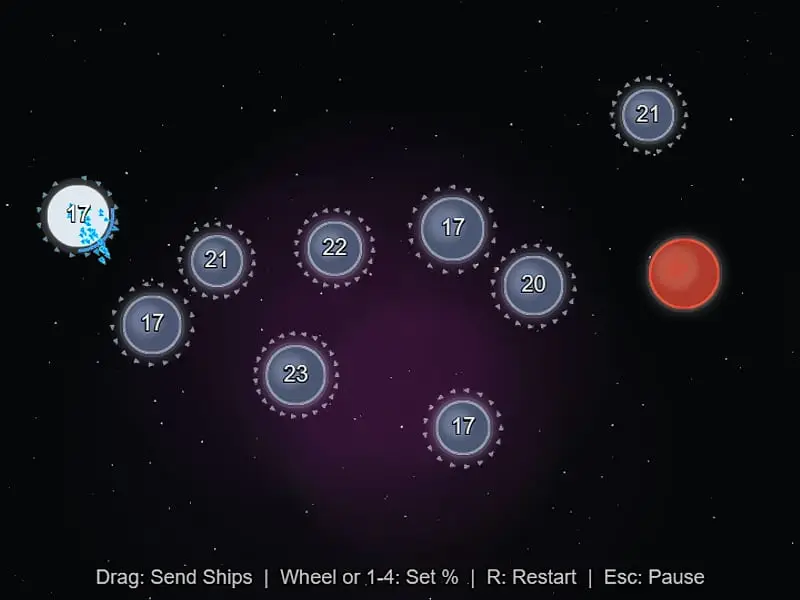
OrbitSwarm is a real-time space strategy game on one screen of planets. Dragging from one of your worlds to another planet launches a stream of ships at it. Captured planets build more ships over time, and you win by taking every red planet before the computer takes yours.
- Category
- Strategy Games
- Players
- 1 player
- Plays on
- Phone, tablet & desktop
- Input
- Mouse, Keyboard, Touch
- Made by
- Frank Force
- Checked
OrbitSwarm turns galactic conquest into a few minutes of dragging lines between planets. Your side begins on a single blue planet, the computer’s on a single red one, and gray neutral worlds float in the space between. Swipe from any world you control toward another and a ribbon of tiny ships streams out along that path. Every planet you hold keeps adding to its garrison, so the match is a race to snowball faster than your rival. Frank Force made it as one of the games in his open-source LittleJS Arcade, and it plays unblocked with a mouse or a finger.
Ships, Planets and the Flow of a Match
Pick a difficulty from the three on the opening menu. The world circled in bright blue is your starting base, and the number on it is its current garrison. Gray worlds also display how many defenders they hold, though that figure stays frozen until somebody conquers them.
Attacking is a single gesture: press, pull the line onto a target, release. Unless you change it, a launch empties half the garrison. Keys 1 to 4 set that share to 10, 25, 50 or 100 percent, and rolling the mouse wheel mid-drag does the same. Aim at a friendly world instead and the ships simply join its garrison, which is how you move muscle toward the frontline.
The fleet travels as a quick trickle, arriving ship after ship. Every arrival at a hostile world knocks out a single defender. Push the defenders past zero and the world flips to your color, keeping any surplus attackers as its new garrison.
Planet size matters. Larger worlds produce faster and hold more ships. Each of your worlds wears a ring that fills up as it nears capacity, and a full world builds nothing more. The red side never reveals its numbers, so you must read its strength from the size of its worlds and how aggressively it moves.
OrbitSwarm controls
| To do this | Keyboard | Mouse | Touch |
|---|---|---|---|
| Launch ships at a target | — | Press on your planet, drag to a target and release | Drag from your planet to a target |
| Choose what share of the fleet leaves | 1 = 10%, 2 = 25%, 3 = 50%, 4 = 100% | Scroll the wheel while dragging | — |
| Start the match over | R | — | — |
| Pause the match | Esc | — | — |
Strategy in Three Phases
Expansion. Look for small, close neutrals with low counts. They are cheap and start producing right away. Avoid big neutral fortresses until you have a few producers working.
Pressure. Watch for the red side launching an attack. The computer likes big launches that strip a world of most of its garrison, so that world is briefly weak. Counterattack the launching planet immediately.
Logistics. Never leave a world sitting at capacity. Capped worlds waste production, so stream spare ships toward your frontline. At the same time, be careful with 100 percent sends. An empty planet invites a cheap recapture.
Why It Clicks
OrbitSwarm is real-time strategy with all the clutter removed: no build menus, no unit types, just numbers and timing. Matches are short, there is no sound, and restarting takes one key. If you prefer turn-based conquest where you can think as long as you like, try Compact Conflict. There are more strategy games to explore as well.
OrbitSwarm: questions players ask
How do you win in OrbitSwarm?
Take every red planet. Neutral gray worlds do not have to be captured, but they make ships for whoever owns them, so grabbing them early is usually how you build the strength to finish the rival. Lose your last planet and the match is over.
How many ships should I send to capture a planet?
Send a bit more than its defenders. Each arriving ship removes one defender, and the planet flips once the count drops below zero. Since the target keeps building while your ships travel, a precise count often comes up one or two short.
Which difficulty should I choose?
Start on EASY, which has 10 planets and gives you 70 ships to the rival's 20. HARD adds more planets, gives the computer a bigger start and lets it see exact numbers and react faster.
Can I play OrbitSwarm on a phone?
Yes. Drag with a finger from one of your planets to a target and lift to launch. The default sends half the ships, since the share keys and mouse wheel are not available on touch screens.
Credits and license
OrbitSwarm was created by Frank Force and released as open source. FreezeNova hosts a lightly adapted copy on its own server, together with the original license file.
- Source code: github.com/KilledByAPixel (original project)
- Code license: MIT
- Art & audio: MIT (planets, ships and starfield drawn in code; no sound)
- Our changes: We put the engine and helper scripts into a single folder beside the game page. The game itself is unchanged.