Hex Formation Unblocked
Six-sided cells, three tower types, ten waves and only ten lives to spare.
Tip: rotate your phone to landscape for a larger view.
What is Hex Formation?
Hex Formation is a defense strategy game set on a honeycomb board. You place standard, rapid-fire and laser turrets along a winding route and upgrade them with the cash you earn from kills. Your aim is to survive all ten waves while keeping as many of your ten lives as you can.
- Category
- Strategy Games
- Players
- 1 player
- Plays on
- Best on desktop, playable on touch
- Input
- Mouse, Touch
- Made by
- Mason Blier
- Checked
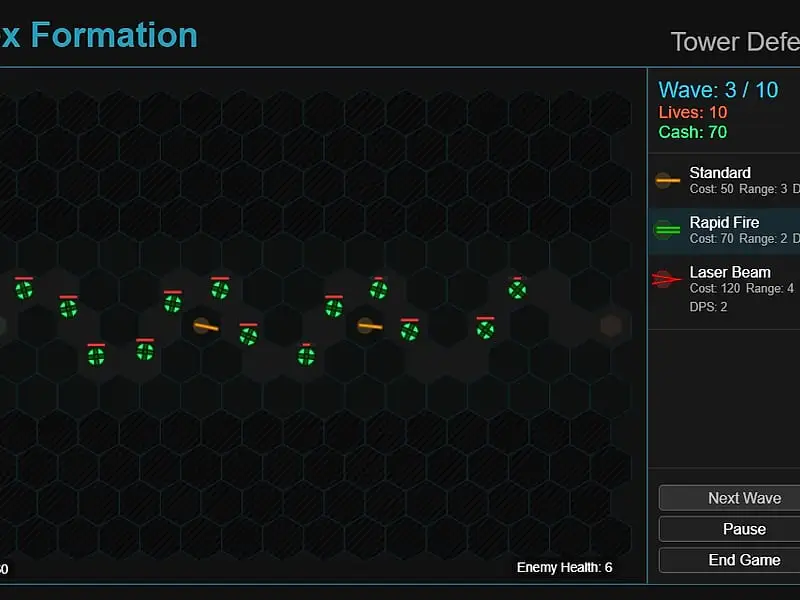
Hex Formation takes the familiar tower defense formula and lays it on a honeycomb. Little green spinners leave a spawn hexagon and trundle along a gray route across the honeycomb, and your job is to line that route with turrets. Because every hexagon touches six others, a turret tucked into a bend can cover much more of the path than it would on a square grid. With ten lives to spare, a trio of turret designs and exactly ten waves to beat, it is a tidy, finishable challenge that runs unblocked in the browser.
How a Run Unfolds
You pick a map first: alternating, zig-zag or loopback. The bank opens at 100 cash with 10 lives in reserve.
Pick a turret type from the panel on the side, then click any solid dark cell bordering the route. When ready, press Start Game. Enemies leave the start cell at a pace of two per second.
Every kill pays twice the enemy’s starting health in cash, so later waves fund bigger builds. An enemy that rolls into the exit costs a life. Once a wave is gone, the next begins automatically, and once the last enemy of a wave is on the board, Next Wave lets you call the following group early.
Enemy health starts at 3 in wave one and reaches 40 by wave ten. The current figure is displayed in the bottom corner, which helps you judge whether your defense is keeping up.
Clear the tenth wave to win. Your score is built from lives left, which count heavily, plus kills and leftover cash.
Hex Formation controls
| To do this | Mouse | Touch |
|---|---|---|
| Select which tower to build | Click Standard, Rapid Fire or Laser Beam in the side panel | Tap a tower type in the side panel |
| Place it on the map | Click an empty dark hexagon next to the path | Tap an empty dark hexagon |
| Inspect a tower and see its range | Click the tower | Tap the tower |
| Level up or sell that tower | Click "Upgrade" or "Sell" | Tap "Upgrade" or "Sell" |
| Begin, or send the next wave sooner | Click "Start Game", then "Next Wave" | Tap "Start Game", then "Next Wave" |
| Pause, continue or end the run | Click "Pause", "Resume" or "End Game" | Tap the same buttons |
A Simple Build Order
Waves 1 to 3. Your opening 100 buys a pair of Standard turrets, 50 apiece. Place them where the road folds back so each can fire at two or three stretches.
Waves 4 to 6. Save for a Laser Beam at 120. Its steady beam has the longest range of the three and never misses, which is exactly what you need as health climbs.
Waves 7 to 10. Upgrade rather than sprawl. Every upgrade lifts damage as well as reach, and the little dots drawn on a turret show how far it has been upgraded. Add Rapid Fire on the tightest corners, since its short range is less of a problem where enemies stay close for longer.
Common mistakes. Placing towers along long straight lines wastes their reach. Forgetting to reselect a tower type after inspecting one leads to wasted taps. And spending everything at once leaves nothing for an emergency upgrade before wave ten.
How It Stacks Up
Compared with endless defense games, Hex Formation is about solving a fixed problem well, then improving your score on each map. The hexagon geometry is a genuine twist rather than decoration. You can pause at any time, and End Game asks for confirmation before quitting. For elemental counters on a square grid, try Elematter. PoliGuard offers an endless alternative with seven tower types.
Hex Formation: questions players ask
Which tower is best in Hex Formation?
Each has a role. Standard towers are the cheapest at 50 and fine for the opening. Rapid Fire spits small shots at short range, ideal on tight corners. The Laser Beam is the priciest at 120, yet it reaches farthest and its beam cannot miss.
How many maps are there?
Three: alternating, zig-zag and loopback. Each one bends the path differently, and the game remembers your best winning score for each map separately in your browser.
Why will a tower not build where I tap?
Light gray cells are the path and striped cells around the border are outside the field. Only solid dark cells accept towers. Also make sure a turret type is still picked, since selecting an existing turret cancels whatever you were about to build.
Can I play Hex Formation on an iPad?
Yes. Taps handle building, selecting and every button. The screen is a desktop-sized layout shrunk to fit, so a tablet in landscape is much more comfortable than a small phone.
Credits and license
Hex Formation was created by Mason Blier and released as open source. FreezeNova hosts a lightly adapted copy on its own server, together with the original license file.
- Source code: github.com/masonblier (original project)
- Code license: MIT
- Art & audio: MIT (all graphics drawn in code on canvas; no image or audio files)
- Our changes: We added a short script that scales the fixed layout to the player and gave the page a new title. The game code itself is untouched.