CSS Diner Unblocked
Order up: write the selector that picks exactly the food the waiter asked for.
Tip: rotate your phone to landscape for a larger view.
What is CSS Diner?
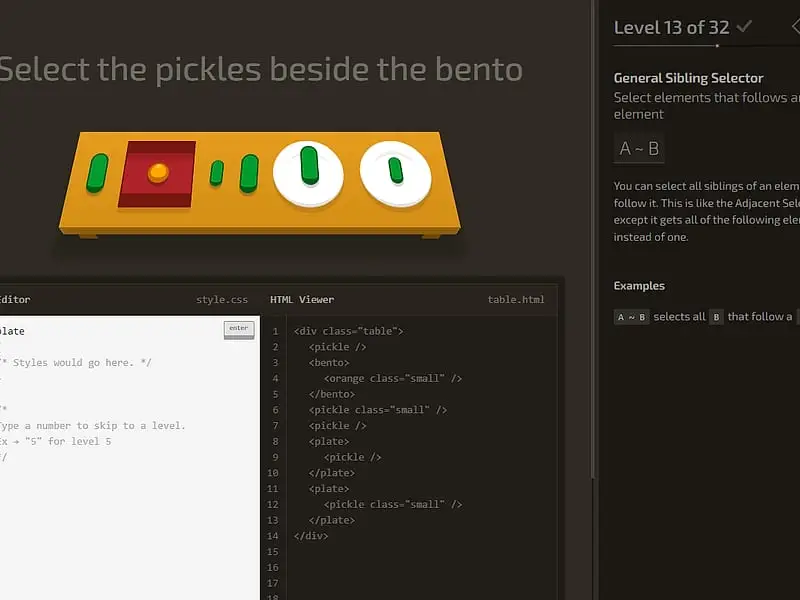
CSS Diner is a browser game for learning CSS selectors. Each of its 32 levels shows a table of plates, boxes and food, highlights the items you must pick, and asks you to type a selector that targets exactly those items. The goal is to work through every selector type, from element names to attribute matches.
- Category
- Puzzle Games
- Players
- 1 player
- Plays on
- Best on desktop, playable on touch
- Input
- Keyboard, Mouse
- Made by
- Luke Pacholski (flukeout)
- Checked
CSS Diner makes one of the trickiest parts of web design feel like waiting tables. A little restaurant scene lays out dishes, lunch boxes and a few kinds of fruit and pickle, and an order appears at the top asking for something specific. You fill the order by typing the CSS selector that would target them if this were a real web page. The table is made of real HTML elements, so your answer is tested on live markup rather than compared to a text answer. Luke Pacholski’s teaching game plays unblocked here.
Filling Each Order
Whatever the order wants is wiggling on the table. Under the table, the HTML Viewer lists the markup for everything you can see. On the right, a help panel explains the selector being taught, with its syntax and a few examples.
Enter your answer in the editor box. Get exactly the wiggling items and they are whisked away, a tick appears beside that level and a new order comes in. Grab extra items, miss some, or mistype, and the editor shakes. There is no penalty for trying again.
The 32 levels are grouped in a sensible order:
- Basics: tag names, IDs and class names, alone and combined
- Grouping and nesting: descendants, comma lists and the
*wildcard - Relationships: the
+,~and>combinators - Pseudo-classes: child and type positions such as
:first-child,:last-childand:nth-of-type, plus:emptyand:not() - Attributes: plain attribute selectors, then
^=,$=and*=
Level 32 is the end of the menu.
CSS Diner controls
| To do this | Keyboard | Mouse |
|---|---|---|
| Write your selector | Type in the CSS Editor box | — |
| Submit the answer | Enter | Click the "enter" button |
| Go straight to a level | Type the level number, then Enter | Open the menu (top right) and click a level |
| Reveal an item's markup | — | Hover over an item on the table or a line in the HTML Viewer |
| Step back or forward a level | — | Click the arrows beside the level title |
| Hide the level list | Esc | — |
Tricks That Save Time
Trust the markup, not the picture. The order describes the goal in plain words, but the HTML Viewer shows which tags, classes and IDs actually exist. Read it before typing.
Hover to connect the two views. Hovering over a dish lights up its markup, and hovering over the markup lights up the dish. It is the quickest way to find what you need.
Space versus greater-than. bento orange finds an orange anywhere inside a bento box, however deep. bento > orange only matches an orange sitting directly in it. Many wrong answers come from this.
nth counts from one. :nth-child(2) is the second child, not the third. Formulas like 2n+1 step through every other element.
Borrow from the examples. The help panel’s examples are written in the exact pattern the level wants. Swap in the right tag or class instead of starting from nothing.
Best on a Laptop
The two-column layout and the hover tooltips work best with a mouse and a full keyboard, so a laptop or desktop is the natural fit. Once selectors make sense, CSS Grid Carrot Patch teaches page layout the same playful way, and Flexbox Lily Pond covers flexbox.
CSS Diner: questions players ask
Is CSS Diner good for complete beginners?
Yes. You need no prior CSS. Each stage includes a plain explanation, the syntax and sample code, and the early levels ask only for a tag name like plate. By the end you are using combinators and pseudo-classes that working developers use daily.
What is the answer to CSS Diner level 1?
The first order asks you to select the plates, so typing plate and pressing Enter solves it. Each later level builds on the selectors you have already used.
Do I have to write the same selector as the example?
No. What matters is the set of elements your rule ends up matching. Any selector that picks exactly the highlighted items and nothing else is accepted.
Can I reset my progress?
Yes. The level menu has a Reset Progress link near its foot. Until then, your current level and solved levels are kept in your browser.
Credits and license
CSS Diner was created by Luke Pacholski (flukeout) and released as open source. FreezeNova hosts a lightly adapted copy on its own server, together with the original license file.
- Source code: github.com/flukeout (original project)
- Code license: MPL-2.0
- Art & audio: MPL-2.0 (table items styled with CSS by the author); Exo 2 font under SIL OFL 1.1, Satisfy font under Apache 2.0
- Our changes: We took out analytics and the share buttons, and now serve the fonts and a scrolling helper from this site rather than outside servers. Levels and answer checking work as the author built them.
- Corresponding source: download