Universal Reversi Unblocked
Classic disc flipping on a board that wraps around, so no corner is ever safe.
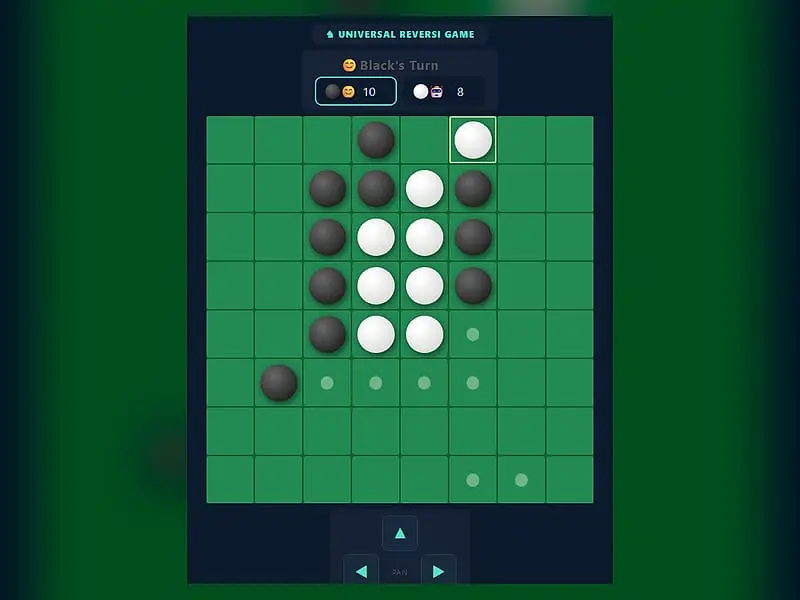
What is Universal Reversi?
Universal Reversi is a two-player flipping game on a wraparound grid, where lines that leave one edge continue on the opposite edge. Each new disc must trap a straight run of enemy discs against one of yours, turning them all to your color. When both sides are out of moves, the bigger disc count wins.
- Category
- Card & Board Games
- Players
- 1–2+ players (same screen)
- Plays on
- Phone, tablet & desktop
- Input
- Mouse, Touch, Keyboard
- Made by
- Norbert Nopper
- Checked
Universal Reversi takes the familiar black-and-white flipping game and removes its walls. On this board, leave through the right side and you come back on the left; the top and bottom are joined too, so the grid behaves like the surface of a donut. That one change wipes out the usual corner strategy and forces you to see lines that cross the border. Norbert Nopper wrote it as one lightweight page offering five computer strengths, three grid sizes and several comfort options, and it plays unblocked right here.
Flanking on a Board With No Edges
Play begins from the usual central square of four discs, two per color, set crosswise. Black moves first by default.
A legal move places your disc so that at least one straight line of enemy discs is sandwiched between the new disc and one you already own. Every sandwiched disc flips. Lines count horizontally, vertically and diagonally, and because of the wraparound, a line can begin near one edge and finish near the opposite one.
Small dots mark every legal cell, so you never have to hunt for a move. Without a legal placement you must pass, and your opponent goes again. Once neither player can place anything, the discs are counted and the higher total takes the game. A tie is possible.
The default setup puts you on Black, facing the computer, on the 8x8 grid. The Game Settings panel lets you change that to two people, put the computer on Black, or watch two computers play. Changes there only kick in after Reset Game; runtime options such as the move dots, animations and computer delay change immediately.
Universal Reversi controls
| To do this | Keyboard | Mouse | Touch |
|---|---|---|---|
| Play a disc | — | Click a cell marked with a dot | Tap a cell marked with a dot |
| Scroll the wrapped board | Arrow keys | Click the PAN arrow buttons | Tap the PAN arrow buttons |
| Restart and apply new settings | — | Click "Reset Game" | Tap "Reset Game" |
| Set players, board size or difficulty | — | Use the Game Settings panel, then reset | Use the Game Settings panel, then reset |
Unlearning Corner Habits
Experienced reversi players need to adjust here more than beginners do.
There are no stable discs. In ordinary reversi, a corner disc can never be flipped. On a wrapping board, every square has neighbors on all sides, so nothing is permanently safe. Judge each disc by how many lines can reach it.
Pan to see the whole line. A wrapped line is split across two sides of the screen. Shift the view with your arrow keys or the on-screen PAN controls until the line you are studying sits in one piece.
Value mobility over discs. Grabbing lots of discs early often just gives your opponent more targets. Try to keep your number of legal moves high and theirs low.
Learn from the computer. While the computer ponders, its candidate cells remain dotted on the board, so you can see what it is choosing between. Raise the response delay toward two seconds to follow exactly which discs flip on each of its turns.
Who Should Try It
If you already know regular reversi, this is a fresh puzzle that will scramble your instincts in a satisfying way. If you are new, the five levels form a smooth ramp, starting at Very Easy and ending at Extra Hard. The high-contrast accessibility mode is a thoughtful extra for anyone who finds the shaded discs hard to tell apart.
Players who enjoy territory battles might also like Go. For a quicker abstract duel on a hexagonal board, try Hex.
Universal Reversi: questions players ask
How is Universal Reversi different from normal reversi?
On a normal board the edges are walls, which makes corners permanent strongholds. Here the board wraps like a donut, so a line leaving the right side continues from the left, and top joins bottom. Every disc can be outflanked from all eight directions.
What board sizes can I play on?
Game Settings offers three sizes, with six, eight or ten squares a side. The smaller board makes for quick, tactical games, while the 10x10 grid gives longer games with more room to maneuver. Press Reset Game for the new size to take effect.
How good is the Extra Hard computer?
It searches the deepest of the five levels, one step beyond Hard. Very Easy plays any legal move and Easy always goes for the biggest immediate haul of flips, so moving up through Medium and Hard is the natural way to improve.
Can I play Universal Reversi with a friend?
Yes. Set both players to human in the Game Settings panel and reset. You take turns on the same screen, and the dots show each player's legal moves.
Is there a color-blind or low-vision mode?
Turn on Accessibility under Runtime Settings. The shaded discs change to flat black and white each outlined by a heavy band of the other color, which makes them far easier to distinguish.
Credits and license
Universal Reversi was created by Norbert Nopper and released as open source. FreezeNova hosts a lightly adapted copy on its own server, together with the original license file.
- Source code: github.com/McNopper (original project)
- Code license: MIT
- Art & audio: MIT (board and discs drawn with CSS, no image or audio files)
- Our changes: We removed the footer links that pointed away from the game. Rules, computer player and layout are exactly as the author built them.