Flexbox Lily Pond Unblocked
Write a line of CSS, watch the frogs hop, and learn flexbox one lily pad at a time.
Tip: rotate your phone to landscape for a larger view.
What is Flexbox Lily Pond?
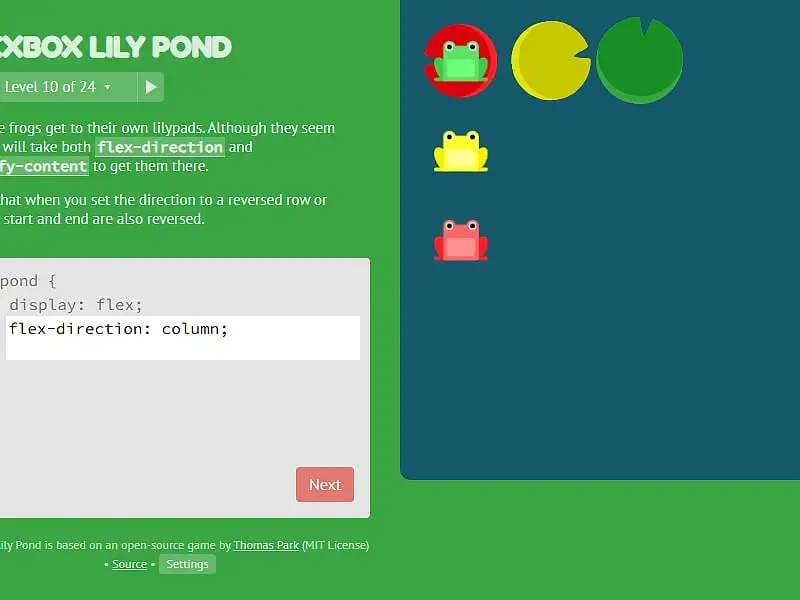
Flexbox Lily Pond is a coding puzzle that teaches CSS flexbox. You type real CSS properties for a pond container, and the frogs move live to wherever your layout sends them. The goal on each of its 24 levels is to seat every frog on the lily pad that matches its color.
- Category
- Puzzle Games
- Players
- 1 player
- Plays on
- Phone, tablet & desktop
- Input
- Keyboard, Mouse, Touch
- Made by
- Thomas Park
- Checked
Flexbox Lily Pond turns a dry chunk of web design into a pond full of frogs that need help getting home. Instead of clicking or dragging, you write genuine CSS, the same flexbox rules a developer uses to line up buttons and menus, and the frogs slide around as you type. That instant feedback is the whole trick: you see what justify-content: space-between does long before you could explain it. Thomas Park’s open-source lesson runs unblocked here on FreezeNova, ads removed, with all 24 levels intact.
What You Are Actually Doing
The screen splits in two. On one side sits a short lesson and a small code editor where #pond { display: flex; } is already filled in. On the other side is the pond itself, with frogs in a row and colored lily pads scattered around.
You fill the empty lines in the editor. The moment a property is valid, the frogs reposition, so you can try a value, watch, and adjust. Once each frog rests on the pad of its own color, the Next button wakes up.
The curriculum builds steadily:
- Levels on the main axis use
justify-contentto push frogs left, right, centered or spread out. - Cross-axis levels bring in
align-itemsto move them up and down. - Direction levels swap rows for columns with
flex-direction, and reversed directions flip what start and end mean. - Single-frog levels use
orderandalign-selfon one color only. - Wrapping levels cover
flex-wrap, theflex-flowshorthand andalign-content.
Toward the end, a single level may need two or three properties working together.
Flexbox Lily Pond controls
| To do this | Keyboard | Mouse | Touch |
|---|---|---|---|
| Write your CSS | Type in the code box | — | Tap the code box and use the on-screen keyboard |
| Send in a working answer | Enter on the last line, or Ctrl + Enter | Click "Next" once it lights up | Tap "Next" |
| Jump to another level | — | Click the level counter, then a level number, or use the side arrows | Tap the level counter, then a level number |
| See every value a property takes | — | Click a highlighted property name in the instructions | Tap a highlighted property name |
| Set difficulty or turn on colorblind mode | — | Click "Settings" under the editor | Tap "Settings" |
Habits That Make the Late Levels Easier
Name the axis out loud. Before typing, decide whether the frogs need to move along the main axis or across it. In a row, the main axis runs sideways; set flex-direction: column and it runs top to bottom, so justify-content suddenly moves frogs vertically.
Treat reverse as a mirror. With row-reverse, flex-start sits on the right. Many wrong answers come from forgetting that.
Keep the two aligns apart. align-items positions frogs inside each line. align-content only matters once frogs wrap onto several lines, and it spaces the lines themselves.
Edit only the frog you were given. When a level hands you a selector for the yellow frog, the other frogs are already fine. Change just that one.
Click the highlighted words. They are a built-in cheat sheet listing every accepted value.
Who Gets the Most Out of It
This suits students in a first web class, self-taught coders who keep looking up flexbox, and teachers who want a fifteen-minute activity with visible results. It also works as a plain logic puzzle for anyone curious about how websites are laid out. When you have mastered the pond, the companion CSS Grid Carrot Patch teaches the grid system the same way, and CSS Diner drills selectors. More learning games live in our puzzle games section.
Flexbox Lily Pond: questions players ask
Do I need to know CSS before playing Flexbox Lily Pond?
No. The first level explains everything you need, starting from a single property. Each later level adds one new idea, and highlighted words open a quick list of values, so a total beginner can finish the set with some patience.
Is there only one right answer per level?
No. The game renders your CSS for real and then checks the result. If every frog ends up on a pad of its color, your answer counts, even if it differs from the one a teacher would write.
Does the game remember which levels I solved?
Yes. Your typed answers and finished levels are stored in your browser, and the level menu marks the ones you have cleared. Clearing site data or switching browsers starts you fresh.
Can students play this unblocked on a school Chromebook?
Yes. It is served from FreezeNova as a small set of local files, with no ads or outside scripts, so it works on most school networks. A physical keyboard makes typing the code quicker.
What does Expert difficulty do?
Expert hides the written instructions and drops you on a random level each time you press Next. You have to read the pond and recall the right property from memory, which makes it a good review test.
Credits and license
Flexbox Lily Pond was created by Thomas Park and released as open source. FreezeNova hosts a lightly adapted copy on its own server, together with the original license file.
- Source code: github.com/thomaspark (original project)
- Code license: MIT
- Art & audio: MIT (frog and lily pad drawings by the author); PT Sans, Fredoka One and Source Code Pro fonts under SIL OFL 1.1
- Our changes: We gave it a new name, stripped out ads, analytics and links to the author's commercial site, serve the fonts from our own server and kept just the English text. The levels and the answer checker work as before.