Range Shading Puzzle Unblocked
Every number has a field of view. Block it with black squares until the count is exact.
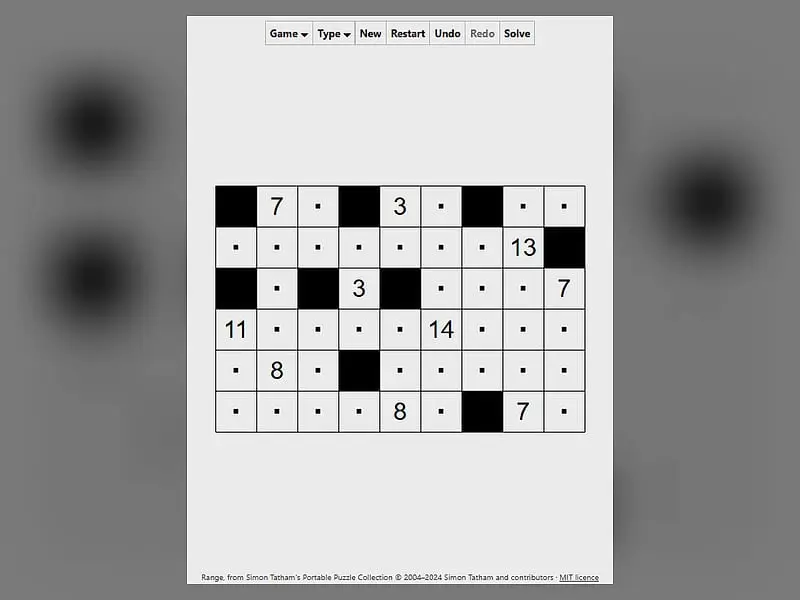
What is Range Shading Puzzle?
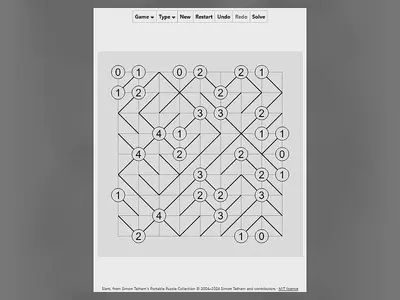
Range Shading Puzzle is a single-player logic grid where you paint some squares black. Each number must see exactly that many white squares, counting itself, looking straight up, down, left and right. Black squares can't touch side to side, and all white squares must stay connected.
- Category
- Puzzle Games
- Players
- 1 player
- Plays on
- Phone, tablet & desktop
- Input
- Mouse, Keyboard, Touch
- Made by
- Jonas Kölker and Simon Tatham
- Checked
Range Shading Puzzle is all about sight lines. Numbers sit on a white grid, and you decide which of the blank squares turn black. Each number acts like a lookout tower: it sees along its row and column until something black blocks the view, and the number of white squares it sees must match its value exactly. You can play it unblocked right here. Jonas Kölker wrote it as Range for Simon Tatham’s puzzle collection, and Japanese puzzle fans know the same idea as Kurodoko.
Four Rules That Work Together
Every finished board obeys all of these at once:
- Numbered squares always stay white.
- Black squares never share a side, although two may touch at a corner.
- The white squares form one connected area, linked through shared sides.
- Each number equals the count of white squares visible from it in the four straight directions, including the number’s own square.
Take a 3 in the middle of an open row. It counts itself, so it sees only two more squares in total. If its row and column currently show seven white squares, black squares have to go somewhere along those lines to cut the view down.
Shade with a left-click and drop a dot with a right-click. A dot is just your note that a square stays white. Clicking repeatedly cycles through black, dot and empty, and the grid flashes once everything checks out.
Range Shading Puzzle controls
| To do this | Keyboard | Mouse | Touch |
|---|---|---|---|
| Paint a square black (press again to cycle) | Move with the arrows, then Enter | Left-click | Tap while the Tap switch is on Shade black |
| Dot a square you know is white (press again to cycle) | Space | Right-click | Press and hold, or flip Tap to Dot and tap |
| Leave dots along a path | Shift + arrows | — | — |
| New puzzle, undo, redo | N, U, R | Buttons above the grid | Buttons above the grid |
Solving Range, Step by Step
Here is a rough order that works on most boards.
Step one: find the limits. For each number, count the most it could possibly see if nothing were black. If that maximum already equals the clue, every square in its lines is white. Dot them.
Step two: squeeze the small clues. A 2 can see itself and one neighbour, nothing more. Three of its four sides must therefore be black or the board edge, and on a corner the answer is often immediate.
Step three: surround each black square. Black squares can’t touch, so the moment you shade one, its four neighbours are white. This single habit creates a lot of new information.
Step four: guard the connection. Before shading near a corner or along the edge, check that you aren’t sealing off a pocket of white. Any black square that splits the white area is wrong, no matter what the numbers say.
Step five: think about shared lines. One black square on a row can shorten the view of two numbers at once. Look for spots where shading helps both.
Shift with the arrow keys drops a line of dots as you move, which is handy once you have proved a whole stretch is white.
Why Range Is Worth a Try
Range sits nicely between number puzzles and shading puzzles. You do some counting, but most of the work is spatial: keeping the white region joined while the numbers pull it apart. Presets run from 9 by 6 up to 16 by 11, and you can set custom widths and heights as well. Preferences even let you swap the mouse buttons.
If you like black-and-white logic, Unruly Black and White is a fun contrast built on balance rather than sight lines. More grid challenges are waiting in our puzzle games section.
Range Shading Puzzle: questions players ask
How do you count what a number sees in Range Shading Puzzle?
Start on the number and count it as one. Then walk outward in all four straight directions, adding each white square, and stop each direction when you hit a black square or the edge. The total must equal the clue.
Is there a trick for solving big Range boards?
Use the four-way neighbour rule constantly. Every time you shade a square, dot its four neighbours white right away. Those dots extend the views of nearby numbers and often settle the next black square for you.
Why does a clue of 1 never appear?
A 1 could only see itself, so all four sides would need to be black. That would cut it off from every other white square, which breaks the connection rule. The game never generates it.
Can I use Range Shading Puzzle on a tablet?
Yes. A switch below the grid decides whether a tap shades or dots, and press and hold places a dot without switching. The board resizes to fit portrait or landscape screens.
Credits and license
Range Shading Puzzle was created by Jonas Kölker and Simon Tatham and released as open source. FreezeNova hosts a lightly adapted copy on its own server, together with the original license file.
- Source code: git.tartarus.org/simon (original project)
- Code license: MIT
- Art & audio: MIT (all graphics are drawn by the game code; no images or audio)
- Our changes: Given a new name for this site. We run the author's official web build without links that leave the site, sized it for our frame and added touch controls including a tap mode switch. No puzzle code was changed.