Backgammon Unblocked
Fifteen checkers, two dice and a doubling cube: get home and off the board before your rival.
What is Backgammon?
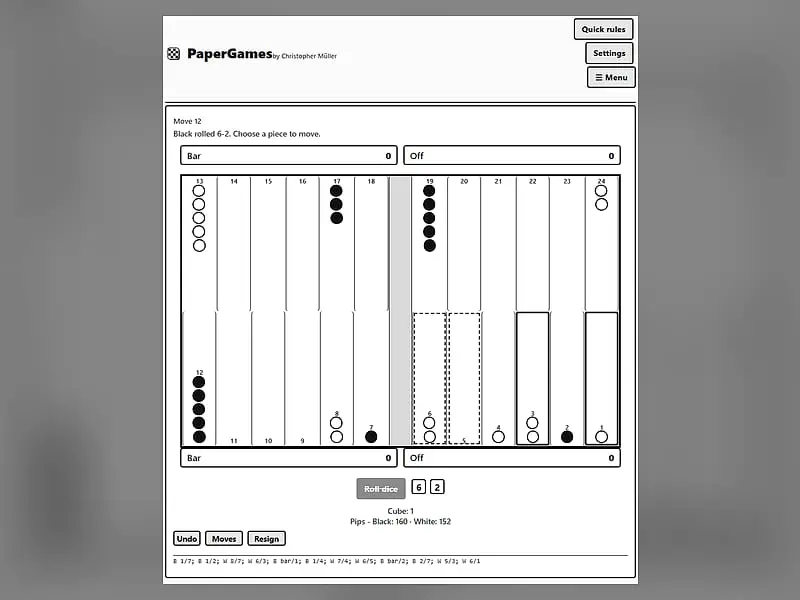
Backgammon is a two-sided dice race on a board of 24 points. You and your opponent move 15 checkers each in opposite directions, hitting lone enemy checkers and blocking the way with points you hold. The goal is to bring every checker into your home board and bear them all off first.
- Category
- Card & Board Games
- Players
- 1–2+ players (same screen)
- Plays on
- Phone, tablet & desktop
- Input
- Mouse, Touch, Keyboard
- Made by
- Christopher Müller
- Checked
Backgammon mixes luck and judgment better than almost any other board game. The dice tell you how far you can go, yet nearly every roll offers several ways to play it, and the good players are the ones who pick well. This copy, taken from Christopher Müller’s PaperGames project, plays the complete game unblocked in your browser: hitting, the bar, bearing off, gammons and a working doubling cube. You can face a computer at three strengths or sit across one screen from a friend, and a pip counter keeps the race honest.
Board, Dice and the Basic Race
Each player owns 15 checkers. They travel around the 24 points in opposite directions, and Black always opens the game. Press the roll button, then use each die as a separate move. Rolling a double means you play that number four times.
A point with two or more enemy checkers is closed to you. A point with just one enemy checker, called a blot, is fair game: land there and that checker is sent to the bar. Anyone with a checker on the bar has to bring it back in through the opponent’s home board before moving anything else, which can cost several turns if that board is well built.
The game insists you use as much of your roll as possible. If only one die can be played, it must be the larger one, and if nothing fits, the turn simply passes.
When all 15 checkers sit inside your home board, you may start removing them with the Off button. Clear the board first and you win.
Backgammon controls
| To do this | Keyboard | Mouse | Touch |
|---|---|---|---|
| Throw the dice | Tab to "Roll dice", then Enter | Click "Roll dice" | Tap "Roll dice" |
| Pick up and place a checker | Arrow keys to a point, Enter, then arrow to the target and Enter | Click a point with your checker (or the Bar), then the target point | Tap a point with your checker (or the Bar), then the target point |
| Take a checker off the board | — | Select the checker, then click "Off" | Select the checker, then tap "Off" |
| Raise the stakes before your roll | — | Click "Double" | Tap "Double" |
| Take back, give up or view the moves so far | — | Click "Undo", "Resign" or "Moves" | Tap "Undo", "Resign" or "Moves" |
| Begin another game | — | Open "Menu", choose "2 Player (local)" or "vs Computer", then "New game" | Open "Menu", choose "2 Player (local)" or "vs Computer", then "New game" |
Playing Better Backgammon
Opening rolls. Early on, use your dice to make points in or near your home board. Two checkers on one point are safe, and every point you own is a door your opponent cannot walk through.
The middle game. Build a run of held points in a row. Four or five side by side form a wall, and an enemy checker stuck behind it may sit there for a long time. Try not to leave a blot within six pips of an enemy checker, because a single die can reach it.
Watch the race. The pip count under the dice shows exactly how far each side still has to travel. If you are well ahead, stop taking risks and just run home. If you are behind, keep a few checkers back hoping for a hit.
Using the cube. Offer a double when your position is clearly better. Against the computer, a big pip lead often makes it refuse, which hands you the game at the current stake.
Bearing off. Spread your checkers across the home board instead of piling them on one point, so more rolls can remove something.
Why This Version Is Worth Your Time
Many browser versions skip the doubling cube or hide the pip count. This one keeps both, adds an undo button and a scrolling move list, and lets you slow down or speed up the computer between moves. There is even an optional setting that suggests a new difficulty after three wins or three losses in a row.
If dice and racing appeal to you, the much older Royal Game of Ur is a fun look at where games like this began. For more two-player tables, browse the card and board games section.
Backgammon: questions players ask
Can I play backgammon against a friend on the same computer?
Yes. Open the menu, pick the local two-player mode and start a new game. You take turns on one screen, and when someone offers a double, the other player accepts or refuses it in a small pop-up window.
Does the computer ever double me?
No. The computer only answers doubles; it never offers one. It takes your double unless it is behind by 16 pips or more, in which case it drops and you collect the current cube value straight away.
What is a gammon and how much is it worth?
If you bear off all your checkers before your opponent has removed a single one, that is a gammon and scores 2. If they also still have a checker on the bar or in your home board, it is a backgammon worth 3. The cube multiplies either.
Will my backgammon game still be there tomorrow?
It should be. The board position, the dice, the cube and the move list are stored in your browser, so reopening the page on the same device and browser brings the game back where you left it.
Which difficulty should a beginner choose?
Start on Easy, which plays random legal moves, to learn how hitting and bearing off work. Medium thinks about progress and safe points, and Hard also estimates the chance of each loose checker being hit, so it leaves far fewer targets.
Credits and license
Backgammon was created by Christopher Müller and released as open source. FreezeNova hosts a lightly adapted copy on its own server, together with the original license file.
- Source code: github.com/YourChaosChris (original project)
- Code license: MIT
- Art & audio: MIT (board, checkers and dice drawn with CSS; no image or audio files)
- Our changes: We separated Backgammon from the bigger PaperGames app so it runs as its own page in English. Its service worker, language menu and links to sibling games are gone. The rules and the computer player were left as they were.