Logic Mines Unblocked
Lucky guesses never work, honest guesses always do. Clear the minefield with logic alone.
What is Logic Mines?
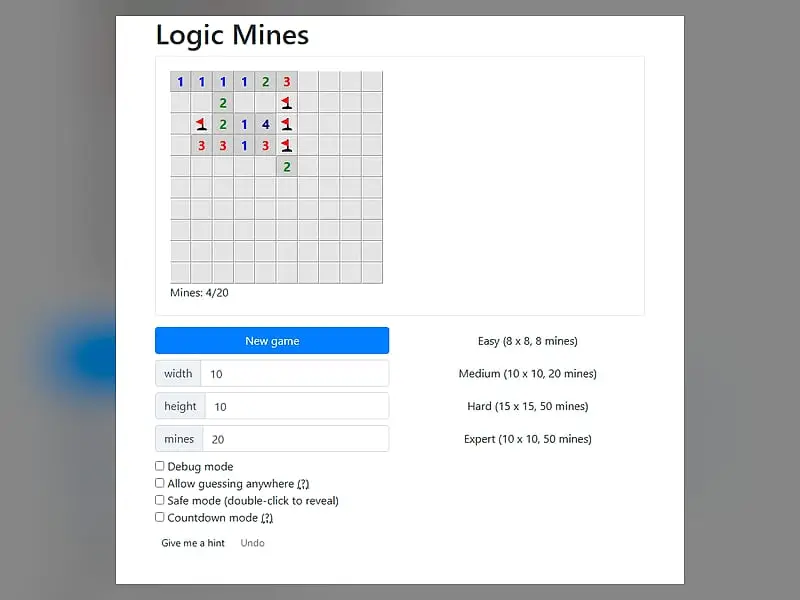
In Logic Mines, mine positions are decided by a solver while you play. Numbers on opened squares count the mines in the surrounding eight cells, and you win by opening every mine-free cell, and because risky guesses are punished while forced guesses are protected, every board can be won by reasoning.
- Category
- Puzzle Games
- Players
- 1 player
- Plays on
- Phone, tablet & desktop
- Input
- Mouse, Touch
- Made by
- Paweł Marczewski
- Checked
Logic Mines is a mine-clearing game that refuses to let luck decide anything. Most versions of this genre eventually leave you staring at two squares, flipping a mental coin. Here, the mines are not fixed when the board appears. A solver places them as you go, and it plays fair in a very specific way: if you click a square you could not prove safe while a safe one existed, it puts a mine under you. If no safe square exists, your guess is protected. Paweł Marczewski built it, and it plays unblocked here with mouse or touch.
How the Twist Plays Out
The basics are what you would expect. An opened cell shows a number from 0 to 8 for the mines touching it, diagonals included. Open every cell without a mine under it to win. The opening click never explodes.
The difference is in what happens on a risky click:
- A safe square was provable somewhere. You picked an unproven cell anyway. The solver drops a mine there and you lose.
- Nothing along the border of the opened region could be proven. Then every border cell that might be empty is empty, so you survive.
- Guessing far from the open area. Not protected by default. Tick “Allow guessing anywhere” if you want that.
After a loss, small markers appear along the border. A dot shows a cell you could have proven safe, an exclamation mark one that had to be a mine, and a question mark a cell that was genuinely undecided. Undo then takes back the fatal click.
Under the grid, pick a preset or type in custom dimensions and a mine total.
Logic Mines controls
| To do this | Mouse | Touch |
|---|---|---|
| Open a square | Left-click | Tap |
| Cycle between flag, question mark and blank | Right-click | Press and hold for half a second |
| Open around a number whose mines are all flagged | Double-click or middle-click the number | — |
| Open a square when safe mode is on | Double-click | — |
| Deal a new minefield | Click "New game" | Tap "New game" |
Playing It Well
The habit to build is patience. Before any click that feels like a guess, sweep the whole border of the opened region for a cell you can actually prove. The game is testing exactly that.
Flag mines as soon as you are sure. It keeps the board readable and makes the double-click chord work, which opens all unflagged neighbors of a satisfied number in one go.
When you are stuck, press the hint button. It reports if a safe cell is available, if you really are forced to guess, or if a flag you placed is mistaken.
On a phone, turn on safe mode. Opening then needs a double tap, so a careless brush of the thumb cannot end a long round.
And after every loss, read the markers. Finding the dot you missed is the fastest way to get better.
Who It Is For
This is for anyone who loves mine-clearing logic but hates losing to a coin flip at the very end. It also makes a great teaching tool, since the post-game markers show the reasoning you skipped. For more deduction from numbers, try Range Shading, or hunt hidden ships in Fleet Strike.
Logic Mines: questions players ask
Is Logic Mines rigged against me?
Only when you gamble needlessly. Click an uncertain square while a certain one is available, the game places a mine there. When nothing at all can be proven, any plausible cell bordering the open region turns out empty.
Can I undo a mistake in Logic Mines?
Yes. After you hit a mine, the Undo button takes back that click so you can keep playing the same board. It is a good way to learn from the exact spot where your logic slipped.
What size boards can I play?
Four presets range from Easy to Expert, and you can also enter your own dimensions and number of mines, with custom grids as large as 30x30.
What is countdown mode?
With countdown on, each number shows how many of its mines are still unflagged instead of the total. A number that drops to zero tells you its remaining neighbors are all safe, which speeds up busy boards.
Credits and license
Logic Mines was created by Paweł Marczewski and released as open source. FreezeNova hosts a lightly adapted copy on its own server, together with the original license file.
- Source code: github.com/pwmarcz (original project)
- Code license: MIT
- Art & audio: MIT (the author's own SVG sprites; Bootstrap 4.3.1 and long-press-event, both MIT)
- Our changes: We renamed it, relabeled the four preset buttons with simple difficulty names and removed links to outside videos and projects. The game logic works as the author wrote it.