Light Switch Grid Unblocked
Press one light and five change. Switch the whole board dark in as few presses as you can.
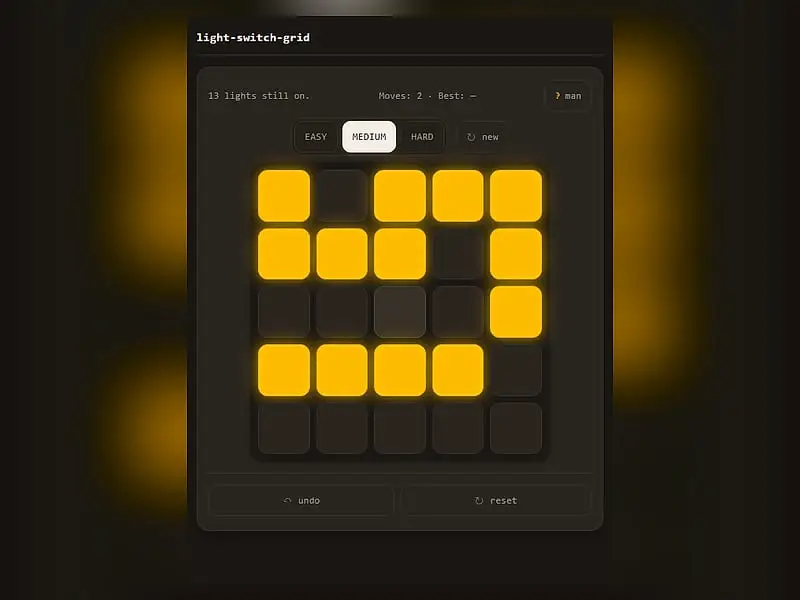
What is Light Switch Grid?
Light Switch Grid is a 5x5 toggle puzzle. Pressing any cell flips it and its neighbors above, below, left and right between on and off. The goal is to turn every light off, using as few presses as possible, on Easy, Medium or Hard boards that refresh daily.
- Category
- Puzzle Games
- Players
- 1 player
- Plays on
- Phone, tablet & desktop
- Input
- Mouse, Touch
- Made by
- Tejas Wavde
- Checked
Light Switch Grid is a 5x5 board of glowing amber squares and a single, slightly cruel rule: touch one and it flips, but so do the four squares beside it. Turning one light off can switch three others on. The aim is a fully dark board, and the puzzle is really about choosing which cells to press rather than how fast. Tejas Wavde’s version has a retro terminal style, a daily board at each level and a saved best score. It runs unblocked on FreezeNova with nothing to install.
Flip Rules
Press a cell and it changes state, along with the cells directly above, below, left and right. Diagonals stay put. A cell on the edge has three neighbors and a corner cell has only two, so pressing near the border changes fewer lights.
A status line shows how many lights remain on, and a counter tracks your presses. Darken the last light and the game reports your total. Beat your previous lowest at that difficulty and it becomes the new Best.
Easy, Medium and Hard decide how scrambled the board starts. Each one opens on the day’s puzzle, and “new” deals a random board. Undo reverses one press; reset returns the board to its opening pattern and zeroes the counter.
Light Switch Grid controls
| To do this | Keyboard | Mouse | Touch |
|---|---|---|---|
| Press a cell to flip it and its side neighbors | — | Click the cell | Tap the cell |
| Take back one press | — | Click "undo" | Tap "undo" |
| Restore the starting lights | — | Click "reset" | Tap "reset" |
| Choose a level or a random board | — | Click Easy, Medium, Hard or "new" | Tap Easy, Medium, Hard or "new" |
| Show or hide the rules page | Esc or Q closes it | Click "? man", then the × or outside the box | Tap "? man", then the × or outside the box |
The Chase Method, Step by Step
There is a classic technique that solves any board, even if it is not always the shortest route.
- Clear row one by pressing row two. For each light on in the top row, press the cell directly under it. When you are done, the top row is dark.
- Repeat downward. Clear row two by pressing row three, then row three with row four, then row four with row five. Lights collect in the bottom row.
- Read the leftovers. The pattern left in the bottom row tells you which cells in the top row to press. The built-in help page touches on this, and you will start to recognize the common patterns after a few boards.
- Press those top cells, then chase again. A second sweep down the board should leave it fully dark.
Two facts make planning easier. Pressing a cell twice does nothing, so never repeat a press. And the order of presses does not matter, only which cells you pressed. That means you can work out a full answer on paper first.
If a chase goes wrong halfway, reset is faster than a long string of undos.
A Good Fit For
This is a tidy pick for a few minutes between classes or meetings: one board, one goal, no timer. The daily board also makes a nice shared challenge with friends. For another short grid teaser, try Flood Fill Puzzle next, or explore more grid logic in Unruly Black White.
Light Switch Grid: questions players ask
What is the fewest number of moves to solve Light Switch Grid?
Each board is made by pressing a set number of random cells on a dark board, 3 on Easy, 6 on Medium and 10 on Hard. Pressing those same cells clears it, so that count is a strong target, and sometimes you can match it.
Is there a new puzzle every day?
Yes. The first board at each difficulty is picked from the current UTC date, so everyone sees the same layout that day. Press "new" for an unlimited supply of random boards.
Does the game save my best score?
It saves your lowest move count for each difficulty in your browser, along with the level you last played. Clearing browser data resets those records.
Can I play Light Switch Grid with a keyboard?
Cells are pressed with a click or tap. The keyboard is only used to close the help page with Esc or Q, so a mouse, trackpad or touch screen is the way to play.
Credits and license
Light Switch Grid was created by Tejas Wavde and released as open source. FreezeNova hosts a lightly adapted copy on its own server, together with the original license file.
- Source code: github.com/wavde (original project)
- Code license: MIT
- Art & audio: MIT (CSS-styled cells and an SVG favicon, no images, fonts or audio)
- Our changes: Yes. It was the "lights-out" game in the author's collection; we renamed it, dropped the web font link and removed the link back to the collection's index page. The game logic is the same.