Sudoku Flow Unblocked
Classic 9x9 sudoku with teaching hints, a daily puzzle and modes for every mood.
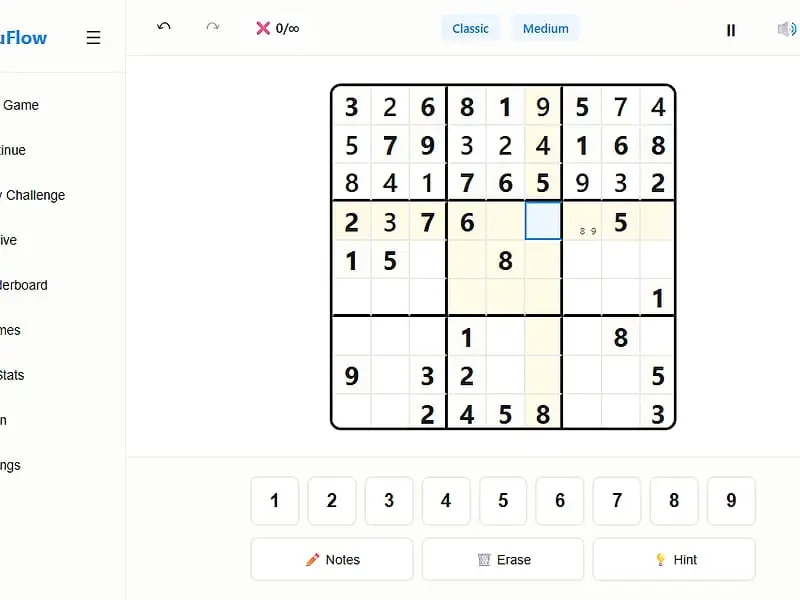
What is Sudoku Flow?
Sudoku Flow is a single-player 9x9 sudoku game. Starting from some given digits, you complete the grid so that every line and every 3x3 block holds one each of 1 through 9. It adds pencil notes, three levels of hints, a daily challenge and modes such as Timed Rush, Zen and Hardcore.
- Category
- Puzzle Games
- Players
- 1 player
- Plays on
- Phone, tablet & desktop
- Input
- Keyboard, Mouse, Touch
- Made by
- Bharani Kumar S
- Checked
Sudoku Flow takes the familiar 9x9 number grid and wraps it in the tools a regular solver actually wants. Pencil notes, highlighted matching digits, unlimited undo and a hint system that explains its reasoning are all there, along with a daily puzzle and several play modes. It even includes short lessons on solving techniques, which makes it a good place to get better rather than just pass time. You can play Sudoku Flow unblocked on this page, and it saves your progress in the browser.
The Grid and the Scoring
Every line across, every line down and every 3x3 block needs one each of 1 through 9. Grey cells are the starting clues and can’t be edited. Pick a blank cell, then type or tap the digit you want.
Placing a duplicate makes both offending cells flash and adds one to your mistake tally. Notes mode lets you pencil small candidate digits into a cell while you reason.
Every puzzle starts with 2,000 points. Mistakes cost 100, hints cost 50, and the clock drains a point each ten seconds. Clues are only taken away while the grid keeps exactly one solution, so logic alone is always enough.
Modes at a glance
- Classic: the standard game.
- Timed Rush: ten minutes on the clock.
- Zen: no countdown and no mistake limit.
- Hardcore: three mistakes and you are out.
- Infinite: a new puzzle begins after each solve.
- Daily Challenge: a fresh medium-level grid each day.
Sudoku Flow controls
| To do this | Keyboard | Mouse | Touch |
|---|---|---|---|
| Pick a cell | Arrow keys | Click the cell | Tap the cell |
| Write a digit | 1 to 9 | Click a number pad button | Tap a number pad button |
| Erase a cell | Backspace or Delete | Click "Erase" | Tap "Erase" |
| Toggle note mode | N | Click "Notes" | Tap "Notes" |
| Ask for help | H | Click "Hint" | Tap "Hint" |
| Step back or forward | Ctrl+Z or Ctrl+Y | Click the arrow buttons up top | — |
| Pause the clock | P | Click the pause button | — |
| List every shortcut | ? | — | — |
Getting Faster at Sudoku
Begin with the nearly full lines. Any line or block with only a gap or two is the quickest win. Clear those first and the rest of the grid opens up.
Scan by digit, not by cell. Choose a number, say 4, and check every box for the one place it can still go. Selecting a filled 4 highlights every other 4, which makes this scan fast.
Write notes on hard grids. At the top two levels, candidates are where patterns hide. Naked pairs and pointing pairs only become visible once your notes are in place.
Use the gentlest hint first. Settings decide how much a hint gives away. The lightest just steers you toward an area, the middle one tells you a cell and its digit, and the strongest writes it in and explains which technique applies. Start low and you still do the thinking.
Open the lessons. The Learn section explains singles, pairs and the bigger fish patterns like X-Wing and Swordfish, with examples you can apply right away.
A Sudoku That Grows With You
Sudoku Flow works for a new player learning what a hidden single is, and for experienced solvers who want an Insane grid with only 17 clues. Six color themes, from Light and Dark to Paper and Midnight, make long sessions easier on the eyes. The daily streak gives a small reason to return every day.
When you want a change of pace, Skyscraper Sightlines uses the same one-of-each rule with towers, and Math Cage Grid adds arithmetic cages to the mix.
Sudoku Flow: questions players ask
Which Sudoku Flow mode should I pick if I hate pressure?
Classic or Zen. Neither has a countdown or a mistake limit, so you can take as long as you need. If you want a steady stream of puzzles instead, Infinite starts a new grid automatically each time you solve one.
How many clues does each difficulty give?
Easy hands you between 36 and 40 digits, while Insane gives just 17 to 21. Custom has a slider so you can pick any number of clues from 17 to 50.
Do hints in Sudoku Flow cost anything?
Yes. Each hint takes 50 points off your score and, unless you change the setting, puts an extra half minute on the clock. Level 1 hints only point at a promising area, so they cost less of the fun than a full answer.
Can I lose a game of Sudoku Flow?
Only in two modes. Hardcore ends on your third mistake, and Timed Rush ends when its ten-minute clock reaches zero. Every other mode lets you keep going until the grid is full.
Does it keep my streak and stats?
Yes. Best times, your daily streak, achievements, a record of finished grids and any unfinished grid are all saved in your browser on that device.
Credits and license
Sudoku Flow was created by Bharani Kumar S and released as open source. FreezeNova hosts a lightly adapted copy on its own server, together with the original license file.
- Source code: github.com/vincenzo-afk (original project)
- Code license: MIT
- Art & audio: MIT (no image or audio files; sounds made in the browser; canvas-confetti library under ISC)
- Our changes: We moved to system fonts, bundled the confetti library locally, gave two color themes new names and sized the board to fit our frame. The puzzle logic is untouched.