FreeCell Solitaire Unblocked
No hidden cards and almost no luck: just you, four free cells and a full deck to sort.
What is FreeCell Solitaire?
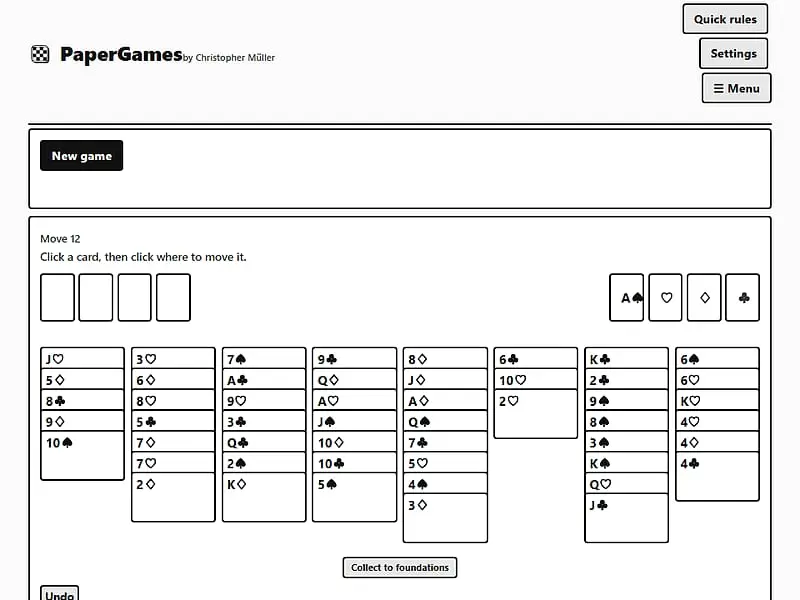
FreeCell Solitaire is a one-player card game in which all 52 cards are dealt face up into eight columns. You move cards between columns in descending, alternating-color order and use four free cells as temporary storage. The goal is to build every suit from Ace up to King on the four foundations.
- Category
- Card & Board Games
- Players
- 1 player
- Plays on
- Phone, tablet & desktop
- Input
- Mouse, Touch, Keyboard
- Made by
- Christopher Müller
- Checked
FreeCell Solitaire is the solitaire for people who hate blaming the shuffle. The entire deck lies face up from the start, so every problem is visible and every win is earned by planning. Four empty cells in the corner act as a parking lot for single cards, and how you use them decides almost everything. This unblocked version, part of Christopher Müller’s PaperGames collection, adds a handy collect button that sweeps all ready cards home at once, plus unlimited undo for the current session.
Columns, Cells and Foundations
The deal. The 52 cards go into eight columns: the first four get seven cards, the last four get six. Everything is face up.
Columns. A card may move onto a card one rank higher in the opposite color. A red 8 goes on a black 9, a black Queen goes on a red King. An empty column accepts any card, or a run if your free space allows it.
Free cells. Each of the four cells holds exactly one card of any kind. Cards in a cell can later go back to a column or up to a foundation. Cells are powerful, but every filled one shrinks how far you can maneuver.
Foundations. Four piles, one per suit, build upward from Ace to King. Select a card and tap the right foundation to place it.
You win when all 52 cards are on the foundations, and a “Cleared” message appears. A move counter records how efficiently you did it.
FreeCell Solitaire controls
| To do this | Keyboard | Mouse | Touch |
|---|---|---|---|
| Pick a card, a run or a parked card | Tab to the card, then Enter or Space | Click the card | Tap the card |
| Drop the selected cards | Tab to the target, then Enter | Click a column, an empty free cell or the matching foundation | Tap a column, an empty free cell or the matching foundation |
| Auto-send all ready cards home | — | Click "Collect to foundations" | Tap "Collect to foundations" |
| Take back a move | — | Click "Undo" | Tap "Undo" |
| Shuffle a new deal | — | Click "New game" (under "Menu" if hidden) | Tap "New game" (under "Menu" if hidden) |
Planning a Clean Solve
Before you touch anything, spend thirty seconds just looking at the deal. Locate all four Aces and the 2s. Note which columns bury them deepest. Your first goal is usually the shortest path to freeing those low cards.
Next, think about space. Every empty free cell lets you move a longer run; every empty column doubles it. Because of that, an empty column is worth more than any single free cell, and you should be slow to fill one.
Avoid using a cell just because you can. Park a card only when you know how it will come out again. Two or three stuck cards in cells is often how a game quietly becomes hopeless.
As you work, build long alternating-color runs in the columns. A tidy run can travel as a unit later, while a messy column needs cells to untangle.
Finally, once the board loosens up, press Collect. It moves every playable card to the foundations, repeating until nothing more fits, and a single Undo reverses the whole batch if you change your mind.
Who FreeCell Is For
If you like logic puzzles more than gambling, FreeCell will suit you. Each deal works like a self-contained puzzle with no timer pushing you, and your progress survives a closed tab.
For a solitaire with face-down cards and a stock to cycle, try Klondike Solitaire. If you enjoy the patience style but want tiles instead of cards, Mahjong Solitaire is a good change of pace.
FreeCell Solitaire: questions players ask
Can every game of FreeCell be won?
Nearly all of them. The deals here are random shuffles with no guarantee, but unwinnable FreeCell layouts are very rare. If you get stuck, it almost always means a better order of moves exists, and Undo lets you go looking for it.
Why can't I move a long run of cards in FreeCell?
The run you can move depends on your free space. Take the number of empty free cells, add one, then double it for every empty column that is not the destination. With one free cell and one spare empty column, you can move four cards.
Is FreeCell easier than regular solitaire?
It is different rather than easier. Since nothing is hidden, luck hardly matters, but you need to plan several moves ahead. Many players find it more satisfying because a loss is always their own mistake.
Does FreeCell save my game if I close the browser?
Yes. The layout and move count are stored on your device and return next time you open the page in the same browser. The undo history does not survive the reload, so finish a risky line first.
Credits and license
FreeCell Solitaire was created by Christopher Müller and released as open source. FreezeNova hosts a lightly adapted copy on its own server, together with the original license file.
- Source code: github.com/YourChaosChris (original project)
- Code license: MIT
- Art & audio: MIT (cards drawn in code with text ranks and inline SVG suits; no image or audio files)
- Our changes: We took FreeCell and the shared files it relies on from the PaperGames app, kept only English, and dropped the offline service worker, the language picker and the menu that linked to the other games. The rules were left alone.