Block Drop Unblocked
Seven shapes, one narrow well and a drop speed that keeps creeping up.
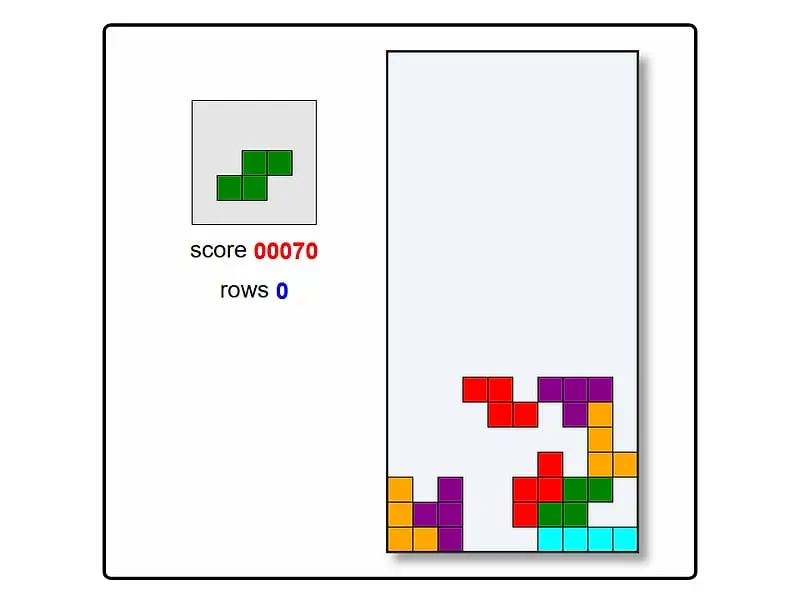
What is Block Drop?
Block Drop is a single-player falling-block puzzle. Four-square shapes tumble into a well ten columns wide, and you slide and rotate them so they complete horizontal rows, which then clear. The goal is to score as much as possible before the stack reaches the top.
- Category
- Puzzle Games
- Players
- 1 player
- Plays on
- Desktop / Chromebook
- Input
- Keyboard, Mouse
- Made by
- Jake Gordon
- Checked
Block Drop strips the falling-block formula down to its bones: a court ten squares wide and twenty tall, a preview box, a score and nothing else. No music, no menus, no power-ups. Jake Gordon wrote it in plain JavaScript as a teaching project, and it plays like a clean practice board for the genre. One quirk sets it apart from the versions most people know: new pieces show up in a random spot along the top instead of dead center. You can play it unblocked here with just the arrow keys.
The Basics of the Well
Hit Space, or click the prompt on screen, and the opening shape drops in. It sinks steadily, a step at a time. Until it touches down you may shift it sideways, spin it, or hurry it along. Once it rests on something it locks, and whatever the preview was showing becomes the new falling shape.
Complete a row from wall to wall and it vanishes, with the blocks above sliding down to close the gap. The left side of the screen tracks your score and cleared rows.
Points come in two ways:
- 10 points for each piece that lands
- 100, 200, 400 or 800 for clearing one, two, three or four rows in a single move
Once the stack is so tall that a fresh shape cannot fit at the top, the run is over and the prompt returns. Pressing Esc quits a run on purpose whenever you want a clean slate.
Pieces are dealt from a shuffled bag that holds four of each of the seven shapes, so long droughts of one shape are rare.
Block Drop controls
| To do this | Keyboard | Mouse |
|---|---|---|
| Begin a run | Space | Click "Press Space to Play." |
| Slide the falling piece sideways | Left and Right arrows | — |
| Turn the piece | Up arrow | — |
| Push the piece down a row | Down arrow (hold to keep dropping) | — |
| Quit the current run | Esc | — |
Playing Well in a Random-Spawn Well
Early game. The drop is slow, so use the time to build a flat, even stack. Keep the far right or far left column empty. That column is your well for the long straight piece, which is the only way to clear four rows at once.
Reading the preview. Always glance at the next shape before placing the current one. Two-piece planning is the difference between a tidy board and a cluttered one.
Rotate near the top. Rotation fails when the spun shape would overlap a wall or a settled block. Spin it while it still has space around it, then slide it into position.
Watch where pieces appear. Because spawn points move around, a tall spike anywhere across the top can end your game, not just one in the center. Keep the whole surface low.
Late game. Speed is the enemy now. Stop chasing four-row clears if the stack is high; single and double clears that keep you alive are worth more than a big combo that never arrives.
Mistakes to avoid. Holding Down too long makes pieces overshoot their spot. Tapping it gives you finer control. And never leave a one-wide hole under an overhang; only the straight piece can fill it, and it may not come in time.
Why Play This Version
Block Drop suits players who want the pure puzzle with no distractions, on a laptop during a short break. If you like stacking games with a twist, Hextris spins the idea around a hexagon, and Same Game Blocks offers a slower, turn-based way to clear a board.
Block Drop: questions players ask
What is a good score in Block Drop?
Scores depend almost entirely on how many multi-row clears you land. Each locked piece adds 10, but a four-row clear is worth 800 on its own, so a player who sets those up regularly will pass a player who clears singles by a wide margin.
Is there a hard drop or hold piece?
No. This is a deliberately minimal build. Each tap of Down lowers the shape by a single step, and there is no hold slot, only the next-piece preview on the left.
Does Block Drop get faster?
Yes. At the start a shape sinks a step every 0.6 seconds, and each cleared row trims that interval a little until it reaches 0.1 seconds after 100 rows.
Can I play it with a controller or on a phone?
Neither. It reads only the keyboard, apart from the click to start, so you need a laptop or desktop with real keys.
Does it remember my high score?
The page shows your score and row count for the current run. There is no saved high score table, so jot down your best if you want to beat it later.
Credits and license
Block Drop was created by Jake Gordon and released as open source. FreezeNova hosts a lightly adapted copy on its own server, together with the original license file.
- Source code: github.com/jakesgordon (original project)
- Code license: MIT
- Art & audio: MIT (blocks drawn on canvas, no image, audio or font files)
- Our changes: Renamed for FreezeNova. We also dropped a background picture whose source was unknown and a frame-rate counter meant for developers. Rules and controls work exactly as before.