Math Cage Grid Unblocked
Each cage has a target and an operator. Fill the grid so every sum and product lands.
What is Math Cage Grid?
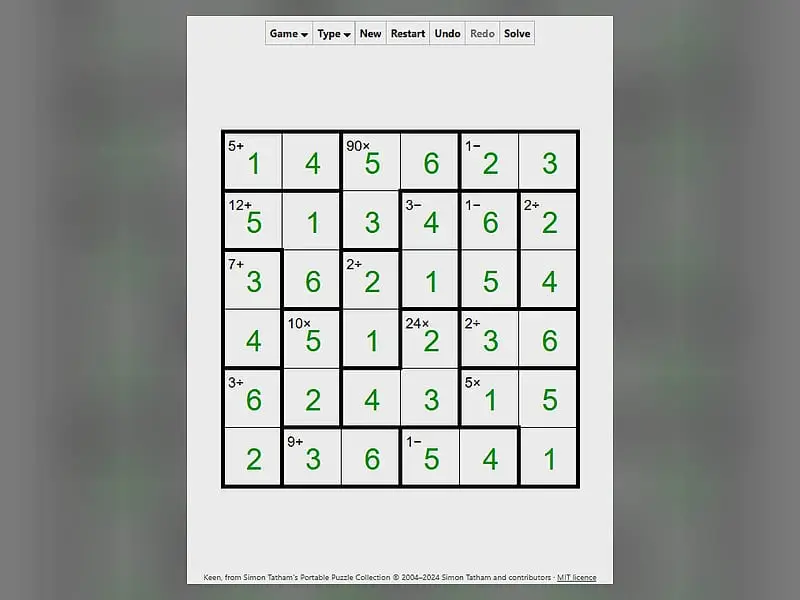
Math Cage Grid is an arithmetic logic puzzle on a square board split into outlined cages. Every row and column holds each digit once, and the digits inside a cage must reach the cage's target using its operation, such as 7+ or 12×. You win when the whole grid is filled correctly.
- Category
- Puzzle Games
- Players
- 1 player
- Plays on
- Phone, tablet & desktop
- Input
- Mouse, Keyboard, Touch
- Made by
- Simon Tatham
- Checked
Math Cage Grid is where sudoku-style placement meets quick mental arithmetic. Heavy borders carve the grid into groups called cages, each carrying a small label like 6+ or 24×. The digits you write inside must reach that number with that operation, while every row and column still uses each digit exactly once. The original name is Keen, from the puzzle collection by Simon Tatham, and each board has one answer you can reason your way to. Play it unblocked here on FreezeNova with a keyboard or the on-screen digit buttons.
Cages and Operations
On a board of size N, each row and column contains 1 to N once. A 6x6 grid therefore uses 1 through 6.
The cages layer arithmetic on top:
- Addition (+): the cage’s digits add up to the target.
- Multiplication (×): they multiply to the target.
- Subtraction (−) and division (÷): used only for pairs of squares. The difference or the quotient of the two digits equals the target, whichever digit is bigger.
- Single squares: the number shown is simply the digit.
Cages may contain a repeated digit, provided the repeats sit in different rows and different columns. Select a square and type to fill it; a right-click beforehand switches to pencil notes. The grid flashes when it is complete.
Presets go from a 4x4 starter up to 6x6 Unreasonable and a big 9x9 board. Custom sizes run from 3 to 9, with an option for multiplication-only cages.
Math Cage Grid controls
| To do this | Keyboard | Mouse | Touch |
|---|---|---|---|
| Place a digit | Arrow keys to move, then type the digit | Click a square, then type a digit | Tap a square, then tap a digit button |
| Toggle a pencil note | Enter switches the cursor to pencil mode, then type a digit | Right-click a square, then type a digit | Set Tap to Pencil mark (or press and hold a square), then tap a digit |
| Wipe a square | Space, Backspace or 0 | — | Tap the square, then Clear |
| Write every possible note in all empty squares | M | — | — |
| New puzzle, undo, redo | N, U, R | Menu buttons above the grid | Menu buttons above the grid |
Number Facts That Unlock Cages
Strong solvers carry a few small facts in their heads. These are all for a 6x6 board, but the ideas scale.
| Cage | Only options |
|---|---|
| 3+ over two squares | 1 and 2 |
| 11+ over two squares | 5 and 6 |
| 5− | 1 and 6 |
| 2÷ | 1 with 2, 2 with 4, or 3 with 6 |
| 3÷ | 1 with 3, or 2 with 6 |
Beyond the table:
- Look for 5s in products. Any product divisible by 5 needs a 5 inside the cage on boards up to 9x9, since no other digit supplies that factor.
- Use the row total. Each row on a 6x6 sums to 21. If whole cages cover a row except for one square, subtraction finds that square.
- Fill notes fast. Press M to put every candidate in every empty square, then strip out what each cage forbids.
Who It Suits
It is a natural fit for students sharpening times tables, puzzle fans who have outgrown plain sudoku, and anyone who wants arithmetic practice that feels like a game. The multiplication-only option is a nice factoring workout. For a different number twist, try Greater-Than Grid, or race the clock in Math Sprint.
Math Cage Grid: questions players ask
How do I solve a Math Cage Grid puzzle?
Start with single-square cages, which give you a digit for free. Then list the few digit pairs that fit tight cages, such as 1 and 2 for 3+, and let the no-repeat rule in each row and column narrow everything else down.
Does order matter for subtraction and division cages?
No. Those clues only appear on two-square cages, and either digit can be the larger one. On a 6x6 board, a 4- cage holds 5 with 1, or 6 with 2, placed whichever way round.
Is there a single correct answer?
Yes. Each generated board has exactly one solution that logic can reach. The hardest setting, Unreasonable, may still need some trial and error along the way.
Does Math Cage Grid work on touch screens?
Yes. Tap a square and then a digit button below the board. Changing the tap setting to Pencil mark lets you jot notes, and Clear empties the chosen square.
Credits and license
Math Cage Grid was created by Simon Tatham and released as open source. FreezeNova hosts a lightly adapted copy on its own server, together with the original license file.
- Source code: git.tartarus.org/simon (original project)
- Code license: MIT
- Art & audio: MIT (all graphics are drawn by the game code; no images or audio)
- Our changes: New name for this site. We run the author's official browser build with external links removed, scaled to our player, and added on-screen digit buttons for touch. The puzzle code is the original.