Factors Game Unblocked
Divide when you can, add when you must, and try to finish on a perfect 1.
What is Factors Game?
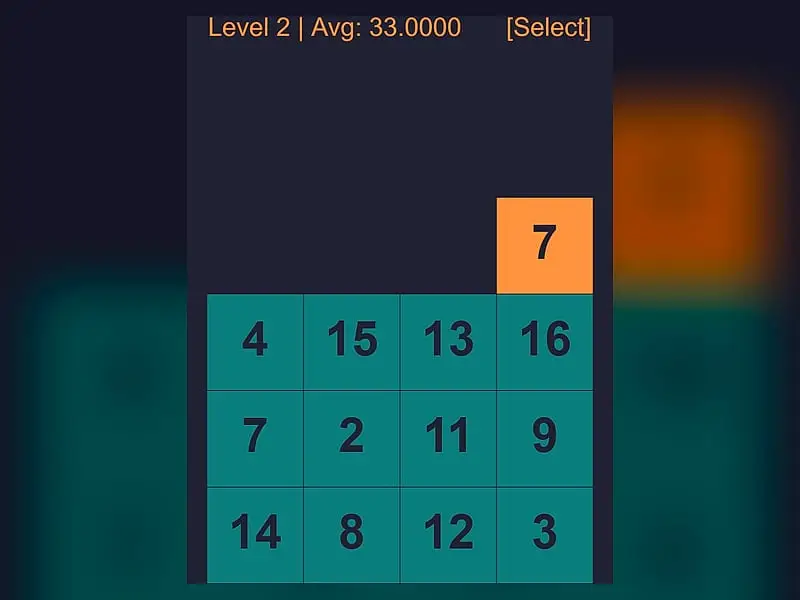
Factors Game is a math puzzle where you guide a number down a 4x4 grid of tiles valued 1 to 16. Landing on a tile that divides your number evenly shrinks it, and landing on any other tile adds that value. The goal on each of 256 levels is to end on exactly 1.
- Category
- Casual Games
- Players
- 1 player
- Plays on
- Phone, tablet & desktop
- Input
- Keyboard, Mouse, Touch
- Made by
- Michael P. Nitowski
- Checked
Factors Game turns a basic school idea, whether one number goes evenly into another, into a tight little puzzle. Your number sits above a 4x4 board, and each row you fall through either divides it or makes it bigger. The trick is choosing a column path that ends on exactly 1. There are 256 levels, and each one starts with the number that matches the level, so level 48 hands you a 48. It plays unblocked on a laptop, a tablet or a phone with simple swipes.
Division or Addition
The board holds sixteen tiles numbered 1 to 16, scattered in a fixed layout for that level. Line your number up with a column and drop it one row. Then the tile underneath decides what happens:
- If the tile is a factor of your number, you divide. A 12 landing on 4 becomes 3.
- If it is not, you add. A 12 landing on 5 becomes 17.
You get four drops at most, one per row, and the level stops early the moment you reach 1. After the last drop you receive a grade, and the next level unlocks whatever the result.
Across all levels, the game tracks your average finishing number. That figure, shown at the top of the board, is your real score, and lower is better.
Factors Game controls
| To do this | Keyboard | Mouse | Touch |
|---|---|---|---|
| Slide your number sideways | Left / Right arrows, A / D, or H / L | Drag left or right across the board | Swipe left or right |
| Drop to the next row | Down arrow, S, or J | Drag down | Swipe down |
| Start the level over (or open level select before moving) | Up arrow, W, or K | Drag up | Swipe up |
| After a result, retry or continue | Left to retry, Right for next, Up for level select | Click "< RETRY" or "NEXT >" | Tap "< RETRY" or "NEXT >" |
| Open level select mid-level | — | Click "[Select]" in the top right corner | Tap "[Select]" in the top right corner |
Solving a Board
Work backward from the bottom. Ask which tiles in the last row could turn a small number into 1, then look for a route that delivers that number. For example, if the bottom row has a 3, you want to arrive there holding a 3.
The 1 tile is your neutral option. It always divides evenly and changes nothing, so it lets you pass through a row without damage.
Addition is not always bad. Sometimes adding a small tile turns an awkward prime into a number with many factors. Landing a 7 on a 5 gives 12, which then splits nicely by 2, 3, 4 or 6.
Restarting is free, and swiping up resets the board at once. If your first route ends high, try again before you accept the result.
Who Will Like It
Factors Game suits students, parents looking for a sneaky math drill, and anyone who enjoys short logic puzzles with a clear right answer. Each level takes seconds, yet a perfect run across hundreds of them is a real challenge. For more number puzzles, try Math Cage Grid or the quick-fire Math Sprint Game.
Factors Game: questions players ask
Is Factors Game good for practicing math?
Yes. Every move asks whether one number divides another, so you rehearse times tables and division without noticing. The early levels use small numbers, and later levels start from larger values that call for more careful planning.
What counts as a good result?
Ending on 1 is the best grade, marked ACE. Any finish under 10 is graded LOW, and anything above that is High. You move on regardless, but your average score rewards low finishes.
Can I go back and improve an old level?
Yes. Open level select, choose any level you have unlocked and play it again. Only your best result is kept, so a better run lowers your overall average.
Does it work on a phone?
It works well. Every move is a swipe, and the menus use large buttons. Hold your phone upright, since the board is taller than it is wide.
Credits and license
Factors Game was created by Michael P. Nitowski and released as open source. FreezeNova hosts a lightly adapted copy on its own server, together with the original license file.
- Source code: github.com/mnito (original project)
- Code license: MIT
- Art & audio: MIT (all graphics drawn on canvas in code, no image or audio assets)
- Our changes: We stripped out the page header, help text, footer and social sharing tags that surrounded the game, so the board fills the whole frame. The game logic was not touched.