Gravity Golf Unblocked
Planets replace sand traps, and every one of them wants to bend your putt.
Tip: rotate your phone to landscape for a larger view.
What is Gravity Golf?
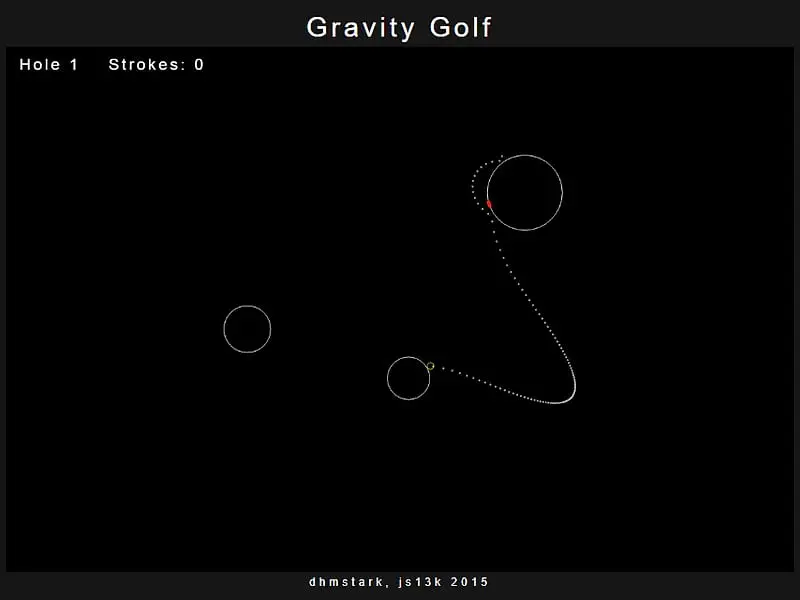
Gravity Golf is a golf game set among the stars, where each world has its own gravity. You hold and drag to aim and set power while a dotted line previews the full path, then release to shoot. You win a hole by making the ball touch a tiny red target on one world, ideally with very few shots, with one extra planet added on each new hole.
- Category
- Sports Games
- Players
- 1 player
- Plays on
- Best on desktop, playable on touch
- Input
- Mouse, Touch
- Made by
- eschatonic
- Checked
Gravity Golf swaps fairways for a starfield. Each hole is a scattering of planets drawn in thin lines, and each one tugs at your ball. Somewhere on one planet’s surface sits a small red marker, and touching it wins the hole. The clever part is the preview: while you aim, a trail of dots maps the entire flight, curves and bounces included. That makes each hole a calm little physics puzzle rather than a guessing game. It was made by eschatonic for js13k in 2015 and plays unblocked on FreezeNova.
Gravity, Explained Simply
Bigger planets pull harder, and the pull is stronger the closer the ball passes. A shot aimed straight at the marker can loop around a large planet and end up somewhere else entirely. On the other hand, a gentle shot can use that pull to swing gracefully onto the target.
The ball also loses energy each time it bounces off a planet, and it comes to rest when it gets slow enough. If it brushes the target at any moment, even in the middle of a bounce, the hole is done.
A Typical Hole
- A new layout appears and the ball drops into open space, drifting until it lands on a planet.
- A yellow outline on the ball means you can shoot.
- Hold the button anywhere and slide the pointer toward your intended line. Distance from the ball sets power.
- Watch the dotted line and adjust until it ends on the marker.
- Release. Your stroke count ticks up.
- Sink it and your stroke total shows briefly before the next layout loads, now with one more planet.
Gravity Golf controls
| To do this | Mouse | Touch |
|---|---|---|
| Aim and pick the strength | Hold the button and move away from the ball in the shot direction; a bigger gap means more power | Press and drag the same way |
| Shoot | Let go of the button | Lift your finger |
Strategy for Fewer Strokes
Sweep before you commit. Hold the button and move the pointer slowly in a small circle. Tiny changes can swing the predicted path dramatically, and you’ll often find an angle you would never have guessed.
Bounce on purpose. Because the dotted trail already accounts for rebounds, a light tap that hops off a neighboring world and settles on the target tends to beat an ambitious long-range strike.
Play in two steps when needed. If no single shot works, park the ball on a world close to the goal. A short second shot is usually easy.
Treat big planets with respect. A hard shot past a large world can turn into a slingshot that is hard to control. Low power keeps things predictable.
Arrive on the right side. The target occupies a single spot on its world. Pick a route that comes down on that face, not the opposite one, because rolling all the way round rarely works.
Who It’s For
Gravity Golf suits players who enjoy thinking more than reacting. There’s no timer, no wind and no par to worry about, just you and a growing pile of planets. It’s also quietly educational, since you get a feel for orbits and slingshot paths by playing.
For golf with clubs and wind, try Coding Golf. For something closer to classic mini golf, Mini Putt Park has nine hand-built holes.
Gravity Golf: questions players ask
How do you play Gravity Golf?
Wait for the ball to settle on a planet, then hold the button and slide the pointer toward your intended line. The dotted preview shows the whole curved path. Release when the dots touch the red marker and the stroke counts.
Why won't the game let me take a shot?
The ball must be resting. A yellow ring around it means it has stopped. While it is still flying or bouncing, the outline stays white and your presses are ignored.
How many holes are there?
The layouts are random and keep coming. The first hole has three planets, and each one you finish adds another to the next layout, so the challenge grows as you go.
What if I fire the ball off into deep space?
On FreezeNova, any ball that floats far beyond the screen edge, or keeps flying for 20 seconds, gets reset to its last position. The lost shot still adds a stroke for that hole.
Does it work on phones?
Dragging with a finger works fine, yet everything is drawn tiny. Turn a phone sideways at the very least; a tablet, or full-screen mode, is far easier on the eyes.
Credits and license
Gravity Golf was created by eschatonic and released as open source. FreezeNova hosts a lightly adapted copy on its own server, together with the original license file.
- Source code: github.com/js13kGames (original project)
- Code license: MIT
- Art & audio: MIT (planets, ball and path drawn as canvas lines; no image or audio files)
- Our changes: We added touch controls, window scaling, a visible stroke counter, an on-screen win message instead of a pop-up box, and a rule that brings back balls lost in space. The physics are the original.