Backyard Slugger Unblocked
One bat, endless pitches, and a fence that only clean timing can clear.
Tip: rotate your phone to landscape for a larger view.
What is Backyard Slugger?
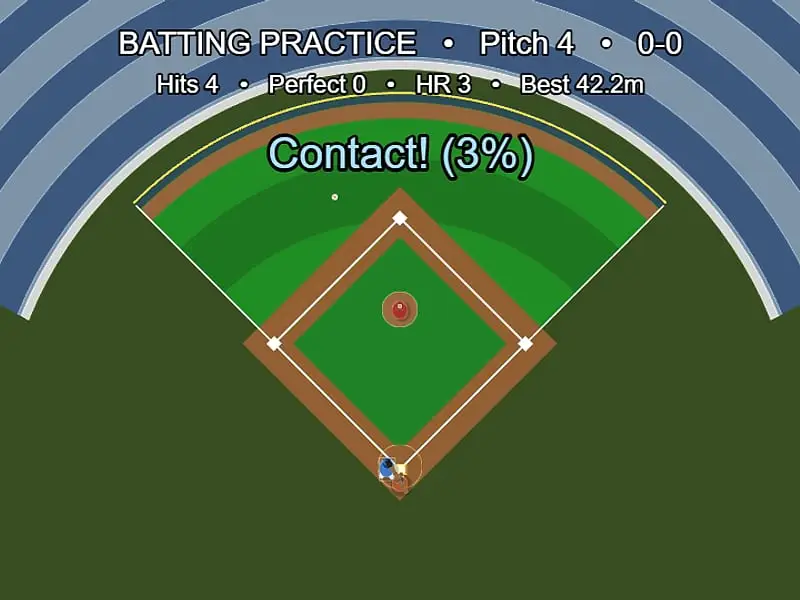
Backyard Slugger is a top-down baseball batting game. A pitcher throws an endless string of pitches and you press one button to swing. The goal is to hit the ball fair and over the outfield fence for home runs, while the game tracks balls, strikes and your contact quality.
- Category
- Sports Games
- Players
- 1 player
- Plays on
- Best on desktop, playable on touch
- Input
- Keyboard, Mouse, Touch, Gamepad
- Made by
- Frank Force
- Checked
Backyard Slugger strips baseball down to the best part: the swing. You look down on a small ballpark from above, standing in the batter’s box while a pitcher keeps the balls coming. There are no innings, no fielders to outrun and no final out, just one button and a fence to clear. Frank Force built it with his LittleJS engine plus Box2D physics, so the ball comes off the bat with believable speed and angle. You can play it unblocked here and treat it like a batting cage that never closes.
At the Plate
The first pitch arrives a moment after you press Play. Each one is a little different in speed and location. About two out of three are aimed into the yellow strike zone over the plate, and the rest drift wide, high or low.
Your swing takes about a quarter of a second to sweep through the zone. When bat meets ball, a percentage pops up to rate the contact. Over 90 counts as PERFECT, over 65 is a Solid hit, and the rest is simple Contact. Better contact means a faster ball.
Direction depends on timing. The ball leaves at a right angle to the bat, so an early swing pulls it one way and a late swing pushes it the other. Only balls that cross the wall between the foul lines are home runs.
The count works like a real at-bat. Three strikes is an out, four balls is a walk, and any hit resets the count.
Backyard Slugger controls
| To do this | Keyboard | Mouse | Touch |
|---|---|---|---|
| Take a swing | Space (or A on a gamepad) | Left click | Tap anywhere |
| Ask for the next pitch now | Enter | — | — |
| Clear your session numbers | R | — | — |
| Open the pause menu | Esc | Menu icon, top right | Menu icon, top right |
Fixing Your Swing
If everything goes foul, check which side. A ball curling past the left line means you were early, so wait a hair longer. A ball going right means you were late.
If you keep whiffing, start sooner. The bat needs time to come around, so begin the swing while the ball is still a few steps out from the plate.
If contact is weak, you are catching the ball near the handle. Aim to meet it toward the barrel’s tip and dead center.
If you are chasing junk, let it go. A pitch outside the zone is free if you leave it alone.
Once your timing is settled, press Enter after each hit to call the next pitch straight away. Keeping a steady rhythm makes your timing far more consistent than waiting through the pause.
Stats Worth Chasing
The screen keeps a running record of hits, perfect hits, home runs and your longest drive. Since there is no win condition, those numbers are your goals. Try a set of 20 pitches and count homers, or aim for three PERFECT readings in a row.
Fits Well With
The game suits quick breaks because there is nothing to set up and no long match to finish. It also works with a gamepad if you prefer a trigger to a mouse. If you like one-button timing tests, Bullseye Archery asks for the same split-second release, and the sports games section has plenty more ball games to try.
Backyard Slugger: questions players ask
How do you hit a home run in Backyard Slugger?
Swing so the bat meets the ball close to its end and on the center line, then make sure the ball leaves between the two white foul lines. A hit that clears the outfield wall in fair territory is a home run. Mistimed contact sends the ball foul.
Does the game ever end?
No. There are no innings or final outs. Strikeouts and walks just reset the count, and you can keep swinging as long as you like. Press R whenever you want fresh session numbers.
Should I swing at every pitch?
No. Roughly a third of pitches miss the yellow strike zone. If you hold still on one of those, it counts as a ball, and four balls is a walk. Swinging and missing always adds a strike.
Can I play Backyard Slugger on an iPhone?
Yes, any tap swings the bat. Turn the phone sideways, though. In portrait the edges of the field and the score lines are cropped, which makes it hard to judge your hits.
Credits and license
Backyard Slugger was created by Frank Force and released as open source. FreezeNova hosts a lightly adapted copy on its own server, together with the original license file.
- Source code: github.com/KilledByAPixel (original project)
- Code license: MIT
- Art & audio: MIT (ballpark, players and ball drawn in code, sound effects generated in code); Box2D physics under the zlib license
- Our changes: We gave it a new name on the title menu and page title, and gathered the engine, Box2D and helper scripts into a single folder. The gameplay has not changed.